常见控件
JFrame窗体
public class JFrameTest {

    public void init(){
        JFrame jFrame = new JFrame("这是一个标题");
        jFrame.setVisible(true);
        jFrame.setBounds(200,200,200,200);
        //JFrame中这样设置颜色无效,需要获取容器并设置容器的颜色
        jFrame.setBackground(Color.green);

        //获取容器,并设置颜色
        Container container = jFrame.getContentPane();
        container.setBackground(Color.yellow);

        //设置关闭事件
        jFrame.setDefaultCloseOperation(WindowConstants.EXIT_ON_CLOSE);

        JLabel jLabel = new JLabel("这是一个Label标签");
        jFrame.add(jLabel);
        //设置标签居中对齐
        jLabel.setHorizontalAlignment(SwingConstants.CENTER);
    }

    public static void main(String[] args) {
        new JFrameTest().init();
    }
}
注意一:
JFrame中直接设置颜色是无效的,需要获取容器并设置容器的颜色
JDialog弹窗
public class JDialogTest {
    public static void main(String[] args) {
        DialogDemo dialogDemo = new DialogDemo();
    }
}

//主窗口
class DialogDemo extends JFrame{
    public DialogDemo() throws HeadlessException {
        this.setVisible(true);
        this.setBounds(200,200,200,200);
        this.setDefaultCloseOperation(WindowConstants.EXIT_ON_CLOSE);

        //JFrame放东西,容器
        Container container = getContentPane();
        //设置绝对定位
        container.setLayout(null);

        JButton button = new JButton("点击打开弹窗");
        button.setSize(150,50);

        button.addActionListener(new ActionListener() {
            private MyDialog dialog = new MyDialog();
            @Override
            public void actionPerformed(ActionEvent e) {
                if(dialog.isVisible()){
                    dialog.setVisible(false);
                }else{
                    dialog.setVisible(true);
                }
                System.out.println(dialog.hashCode());
            }
        });

        container.add(button);
    }
}

//弹窗的窗口
class MyDialog extends JDialog{
    public MyDialog() {
        setVisible(true);
        setBounds(300,300,300,300);
        //setDefaultCloseOperation(WindowConstants.EXIT_ON_CLOSE);
        setDefaultCloseOperation(WindowConstants.DISPOSE_ON_CLOSE);
        JLabel label = new JLabel("lalalalala");
        Container container = getContentPane();
        container.add(label);
    }
}
在弹窗中如果设置
setDefaultCloseOperation(WindowConstants.EXIT_ON_CLOSE);,即设置了弹窗的关闭方式为退出时,程序会抛出如下异常。Exception in thread "AWT-EventQueue-0" java.lang.IllegalArgumentException: defaultCloseOperation must be one of: DO_NOTHING_ON_CLOSE, HIDE_ON_CLOSE, or DISPOSE_ON_CLOSE at javax.swing.JDialog.setDefaultCloseOperation(JDialog.java:755) at gui.MyDialog.<init>(JDialogTest.java:45) at gui.DialogDemo$1.actionPerformed(JDialogTest.java:32) at javax.swing.AbstractButton.fireActionPerformed(AbstractButton.java:2022) at javax.swing.AbstractButton$Handler.actionPerformed(AbstractButton.java:2348) at javax.swing.DefaultButtonModel.fireActionPerformed(DefaultButtonModel.java:402) at javax.swing.DefaultButtonModel.setPressed(DefaultButtonModel.java:259)
几种关闭窗口方式比较:
- DO_NOTHING_ON_CLOSE:不响应关闭操作
- HIDE_ON_CLOSE:点击关闭按钮隐藏窗口(进程仍然存在)
- DISPOSE_ON_CLOSE:销毁窗口,当JVM最后一个窗口被销毁,则JVM停止
- EXIT_ON_CLOSE:停止JVM,所有窗口均被关闭
JLabel标签
- 普通标签
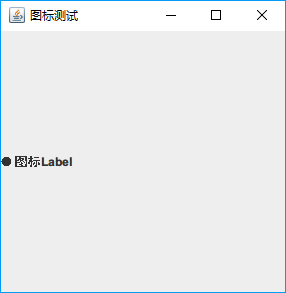
JLabel label = new JLabel("lalalalala");- 图标标签
public class JLabelTest {
    public static void main(String[] args) {
        JFrame frame = new JFrame("图标测试");
        frame.setBounds(300,300,300,300);
        IconDemo icon = new IconDemo(10, 10);
        JLabel label = new JLabel("图标Label", icon, SwingConstants.LEFT);
        frame.add(label);

        frame.setVisible(true);
        frame.setDefaultCloseOperation(WindowConstants.EXIT_ON_CLOSE);
    }
}

class IconDemo implements Icon{

    private int width;
    private int height;

    public IconDemo() {
    }

    public IconDemo(int width, int height) throws HeadlessException {
        this.width = width;
        this.height = height;
    }

    @Override
    public void paintIcon(Component c, Graphics g, int x, int y) {
        g.fillOval(x,y,width,height);
    }

    @Override
    public int getIconWidth() {
        return this.width;
    }

    @Override
    public int getIconHeight() {
        return this.height;
    }
}
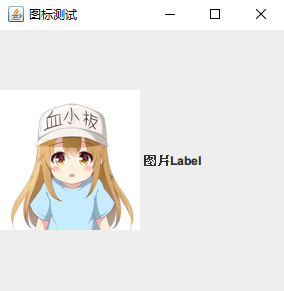
- 图片标签
public class JLabelTest {
    public static void main(String[] args) {
        JFrame frame = new JFrame("图标测试");
        frame.setBounds(300,300,300,300);

        //IconDemo icon = new IconDemo(10, 10);
        //URL url = JLabelTest.class.getResource("HeadPhoto.jpg");
        URL url = JLabelTest.class.getClassLoader().getResource("gui/HeadPhoto.jpg");
        //图片图标
        ImageIcon icon = new ImageIcon(url);
        JLabel label = new JLabel("图片Label", icon, SwingConstants.LEFT);
        frame.add(label);

        frame.setVisible(true);
        frame.setDefaultCloseOperation(WindowConstants.EXIT_ON_CLOSE);
    }
}
JPanel面板
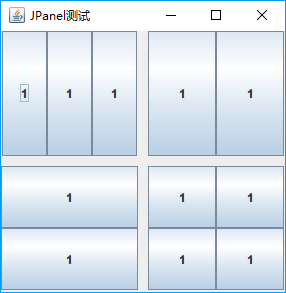
- 普通面板
public class JPanelTest {
    public static void main(String[] args) {
        JFrame frame = new JFrame("JPanel测试");
        frame.setBounds(300,300,300,300);
        Container container = frame.getContentPane();
        //设置间距
        container.setLayout(new GridLayout(2,2,10,10));
        JPanel panel = new JPanel(new GridLayout(1, 3));
        JPanel panel2 = new JPanel(new GridLayout(1, 2));
        JPanel panel3 = new JPanel(new GridLayout(2, 1));
        JPanel panel4 = new JPanel(new GridLayout(2, 2));

        panel.add(new JButton("1"));
        panel.add(new JButton("1"));
        panel.add(new JButton("1"));
        panel2.add(new JButton("1"));
        panel2.add(new JButton("1"));
        panel3.add(new JButton("1"));
        panel3.add(new JButton("1"));
        panel4.add(new JButton("1"));
        panel4.add(new JButton("1"));
        panel4.add(new JButton("1"));
        panel4.add(new JButton("1"));

        container.add(panel);
        container.add(panel2);
        container.add(panel3);
        container.add(panel4);

        frame.setVisible(true);
        frame.setDefaultCloseOperation(WindowConstants.EXIT_ON_CLOSE);
    }
}
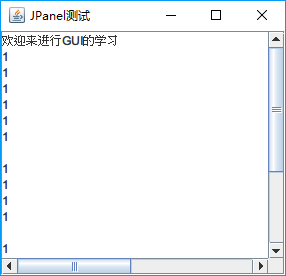
- 滚动面板
当内容大小超过面板大小时,就会出现滚动条
public static void main(String[] args) {
    JFrame frame = new JFrame("JPanel测试");
    frame.setBounds(300,300,300,300);
    Container container = frame.getContentPane();

    JTextArea textArea = new JTextArea(20, 50);
    textArea.setText("欢迎来进行GUI的学习");

    JScrollPane scrollPane = new JScrollPane(textArea);
    container.add(scrollPane);

    frame.setVisible(true);
    frame.setDefaultCloseOperation(WindowConstants.EXIT_ON_CLOSE);
}
按钮
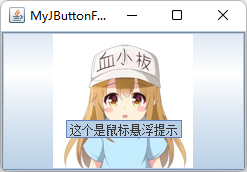
JButton图片按钮
class JButtonDemo1 extends MyJButtonFrame{
    public JButtonDemo1() throws HeadlessException {
        Container container = getContentPane();

        URL url = this.getClass().getResource("HeadPhoto.jpg");
        ImageIcon imageIcon = new ImageIcon(url);

        JButton button = new JButton();
        button.setSize(20,10);
        //设置按钮图标
        button.setIcon(imageIcon);
        //设置按钮提示文本
        button.setToolTipText("这个是鼠标悬浮提示");

        container.add(button);
    }
}
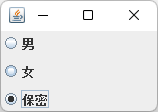
JRadioButton单选按钮
//单选按钮
class JButtonDemo2 extends MyJButtonFrame{
    public JButtonDemo2() throws HeadlessException {
        //单选框
        JRadioButton radioButton1 = new JRadioButton("男");
        JRadioButton radioButton2 = new JRadioButton("女");
        JRadioButton radioButton3 = new JRadioButton("保密");
        //将单选框分组,实现只能选一个
        ButtonGroup buttonGroup = new ButtonGroup();
        buttonGroup.add(radioButton1);
        buttonGroup.add(radioButton2);
        buttonGroup.add(radioButton3);

        Container container = getContentPane();
        container.add(radioButton1,BorderLayout.NORTH);
        container.add(radioButton2,BorderLayout.CENTER);
        container.add(radioButton3,BorderLayout.SOUTH);
    }
}
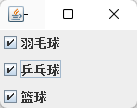
JCheckBox多选按钮
class JButtonDemo3 extends MyJButtonFrame{
    public JButtonDemo3() throws HeadlessException {
        JCheckBox checkBox1 = new JCheckBox("羽毛球");
        JCheckBox checkBox2 = new JCheckBox("乒乓球");
        JCheckBox checkBox3 = new JCheckBox("篮球");

        Container container = getContentPane();
        container.add(checkBox1,BorderLayout.NORTH);
        container.add(checkBox2,BorderLayout.CENTER);
        container.add(checkBox3,BorderLayout.SOUTH);
    }
}
列表
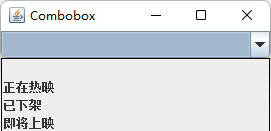
JComboBox下拉框
class ComboboxDemo1 extends MyJFrame{
    public ComboboxDemo1() throws HeadlessException {
        super("Combobox");

        JComboBox<String> comboBox = new JComboBox<>();
        comboBox.addItem(null);
        comboBox.addItem("正在热映");
        comboBox.addItem("已下架");
        comboBox.addItem("即将上映");

        this.getContainer().add(comboBox);

    }
}
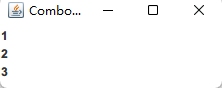
JList列表框
class ComboboxDemo2 extends MyJFrame{
    public ComboboxDemo2() throws HeadlessException {
        super("Combobox");

        String[] arr = new String[]{"1","2","3"};
        JList<String> list = new JList<>(arr);
        this.getContainer().add(list);

    }
}
文本框
JTextField文本框
JTextField field = new JTextField("Hello",20);
JTextField field2 = new JTextField("World",10);
frame.getContainer().add(field,BorderLayout.NORTH);
frame.getContainer().add(field2, BorderLayout.SOUTH);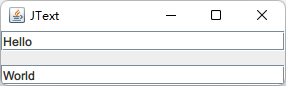
JPasswordField密码框
JPasswordField passwordField = new JPasswordField();
passwordField.setEchoChar('3');//默认替换字符为·
frame.getContainer().add(passwordField);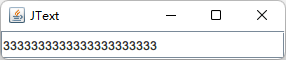
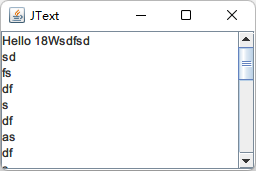
JTextArea文本域
JTextArea textArea = new JTextArea();
textArea.setText("Hello 18W");

JScrollPane jScrollPane = new JScrollPane(textArea);
frame.getContainer().add(jScrollPane)