GUI:图形化界面编程
AWT简介
Abstract Windows Tools(抽象的窗口工具)
Frame
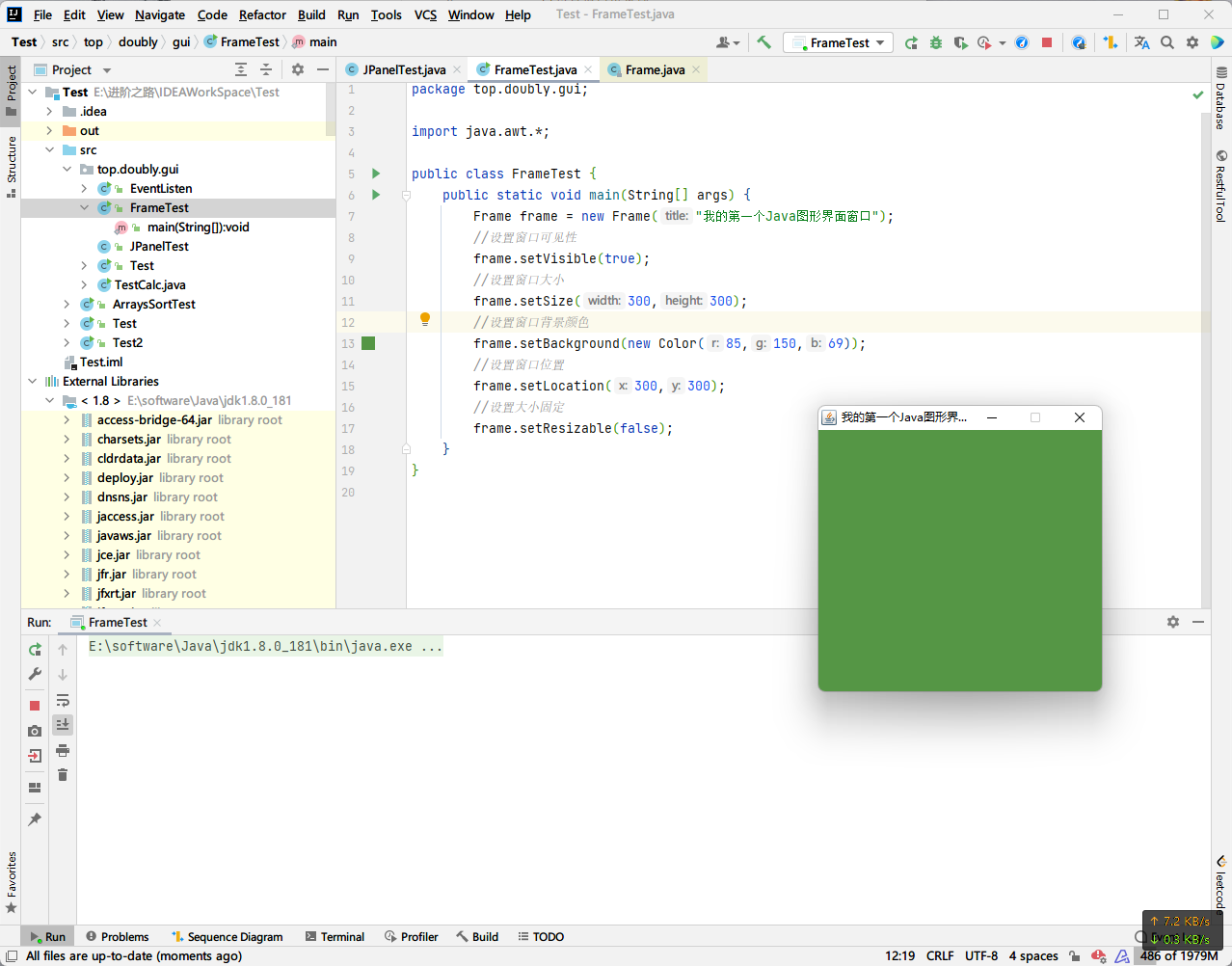
基本代码
public class FrameTest {
    public static void main(String[] args) {
        Frame frame = new Frame("我的第一个Java图形界面窗口");
        //设置窗口可见性
        frame.setVisible(true);
        //设置窗口大小
        frame.setSize(300,300);
        //设置窗口背景颜色
        frame.setBackground(new Color(85,150,69));
        //设置窗口位置
        frame.setLocation(300,300);
        //设置大小固定
        frame.setResizable(false);
    }
}
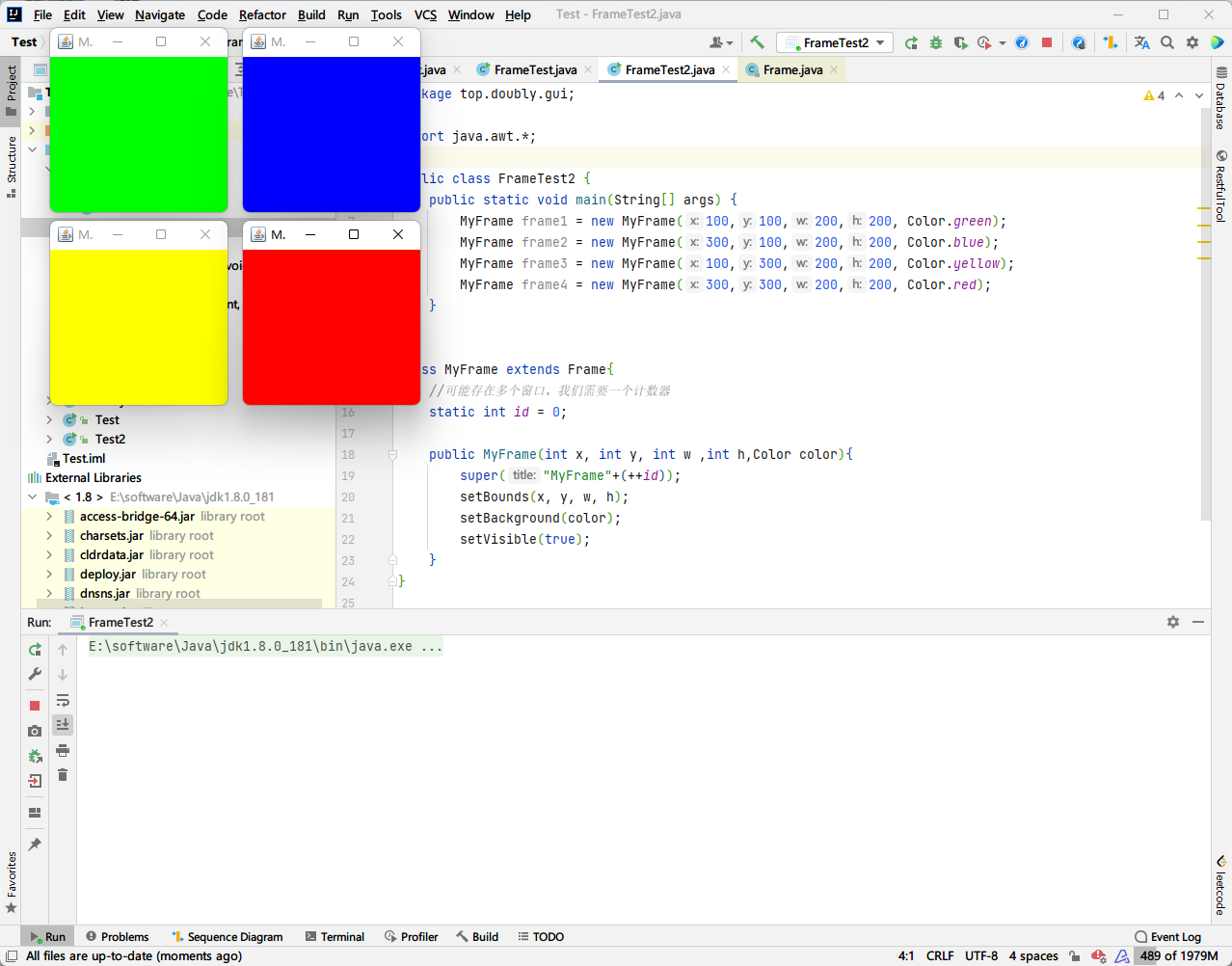
展示多个窗口
public class FrameTest2 {
    public static void main(String[] args) {
        MyFrame frame1 = new MyFrame(100,100,200,200, Color.green);
        MyFrame frame2 = new MyFrame(300,100,200,200, Color.blue);
        MyFrame frame3 = new MyFrame(100,300,200,200, Color.yellow);
        MyFrame frame4 = new MyFrame(300,300,200,200, Color.red);
    }
}

class MyFrame extends Frame{
    //可能存在多个窗口,我们需要一个计数器
    static int id = 0;

    public MyFrame(int x, int y, int w ,int h,Color color){
        super("MyFrame"+(++id));
        setBounds(x, y, w, h);
        setBackground(color);
        setVisible(true);
    }
}
Panel
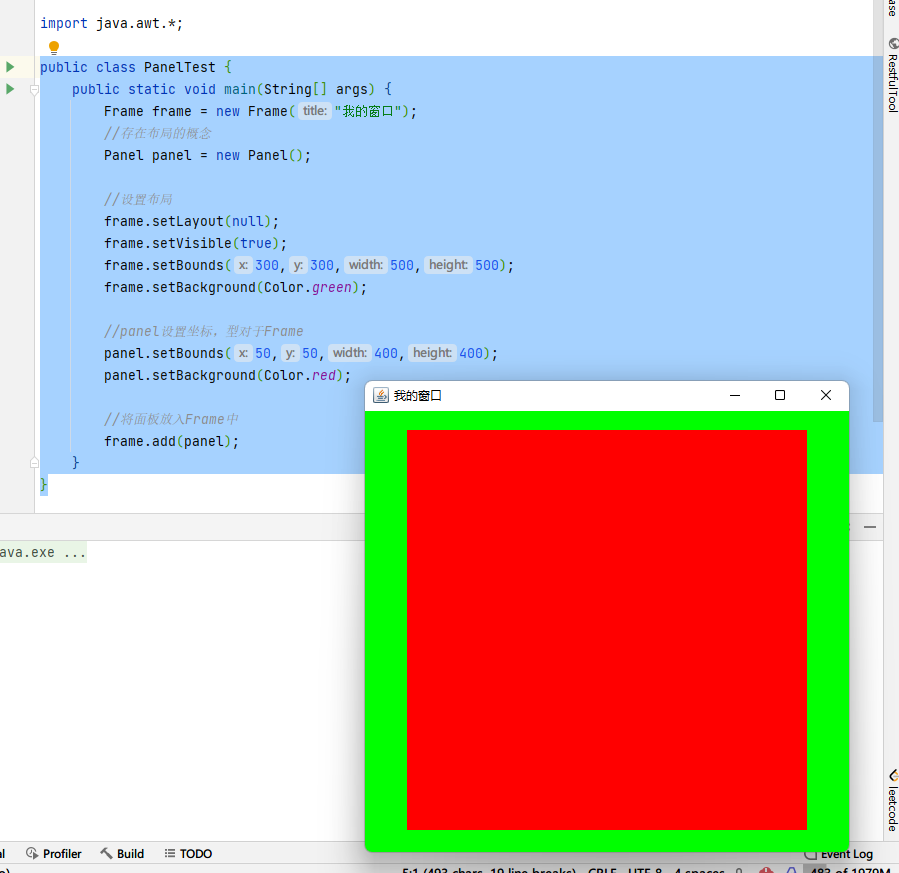
Panel可以堪称一个容器,但是不能单独存在
public class PanelTest {
    public static void main(String[] args) {
        Frame frame = new Frame("我的窗口");
        //存在布局的概念
        Panel panel = new Panel();

        //设置布局
        frame.setLayout(null);
        frame.setVisible(true);
        frame.setBounds(300,300,500,500);
        frame.setBackground(Color.green);

        //panel设置坐标,型对于Frame
        panel.setBounds(50,50,400,400);
        panel.setBackground(Color.red);

        //将面板放入Frame中
        frame.add(panel);

        //监听事件,监听窗口关闭事件
        //适配器模式
        frame.addWindowListener(new WindowAdapter() {
            @Override
            public void windowClosing(WindowEvent e) {
                System.exit(0);
            }
        });
    }
}
布局管理器
流式布局
public class FlowLayoutTest {
    public static void main(String[] args) {
        Frame frame = new Frame();

        //新建按钮
        Button btn1 = new Button("btn1");
        Button btn2 = new Button("btn2");
        Button btn3 = new Button("btn3");

        //设置流式布局
        //frame.setLayout(new FlowLayout());
        frame.setLayout(new FlowLayout(FlowLayout.LEFT));
        frame.setBounds(100,100,200,200);
        frame.setVisible(true);

        //添加按钮到Frame中
        frame.add(btn1);
        frame.add(btn2);
        frame.add(btn3);
    }
}- 居中布局
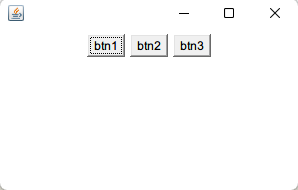
- 靠左布局
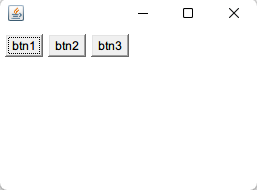
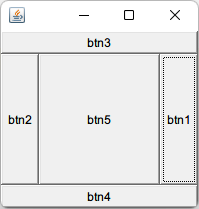
东西南北中
public class FlowLayoutTest2 {
    public static void main(String[] args) {
        Frame frame = new Frame();

        //新建按钮
        Button btn1 = new Button("btn1");
        Button btn2 = new Button("btn2");
        Button btn3 = new Button("btn3");
        Button btn4 = new Button("btn4");
        Button btn5 = new Button("btn5");

        frame.setBounds(100, 100, 200, 200);
        frame.setVisible(true);

        //添加按钮到Frame中
        frame.add(btn1,BorderLayout.EAST);
        frame.add(btn2,BorderLayout.WEST);
        frame.add(btn3,BorderLayout.NORTH);
        frame.add(btn4,BorderLayout.SOUTH);
        frame.add(btn5,BorderLayout.CENTER);
    }
}
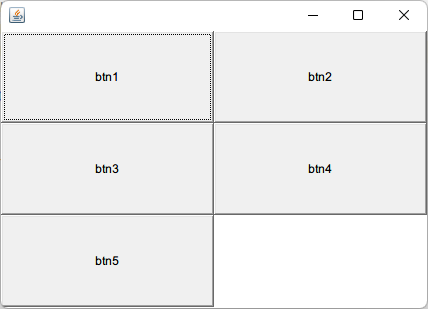
表格布局 Grid
public class GridLayoutTest {
    public static void main(String[] args) {
        Frame frame = new Frame();

        //新建按钮
        Button btn1 = new Button("btn1");
        Button btn2 = new Button("btn2");
        Button btn3 = new Button("btn3");
        Button btn4 = new Button("btn4");
        Button btn5 = new Button("btn5");

        frame.setBounds(100, 100, 200, 200);
        frame.setVisible(true);

        frame.setLayout(new GridLayout(3,2));

        //添加按钮到Frame中
        frame.add(btn1);
        frame.add(btn2);
        frame.add(btn3);
        frame.add(btn4);
        frame.add(btn5);

        //根据组件的大小自动调整窗口大小
        frame.pack();

    }
}
画笔
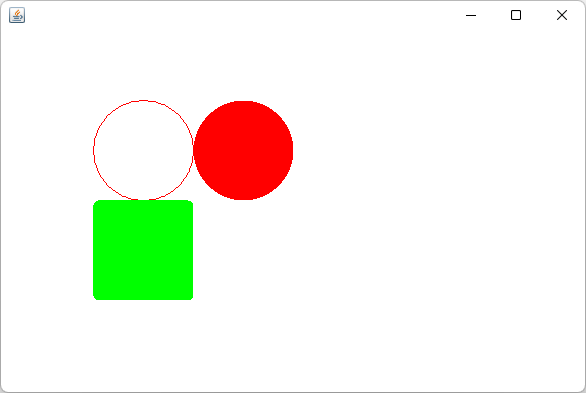
Frame在初始化时,会自动调用一次画笔的paint方法。如果需要重新绘制,则需要repaint()
public class PaintTest {
    public static void main(String[] args) {
        new MyPaint().init();
    }
}

class MyPaint extends Frame{

    public void init(){
        setVisible(true);
        setBounds(200,200,600,400);
    }

    //画笔
    @Override
    public void paint(Graphics g) {
        //设置颜色
        g.setColor(Color.red);
        //画一个圆
        g.drawOval(100,100,100,100);
        //实心圆
        g.fillOval(200,100,100,100);
        g.setColor(Color.green);
        //圆角矩形
        g.fillRoundRect(100,200,100,100,10,10);

    }
}
事件监听
解释:当某个事情发生的时候,将要干什么
按钮事件监听
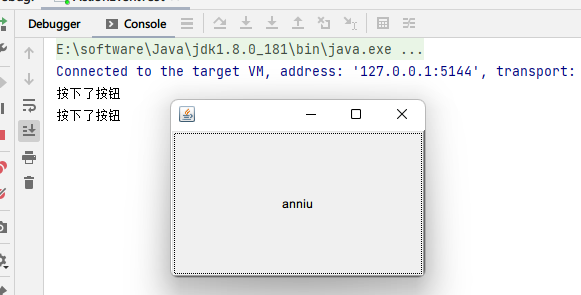
public class ActionEventTest {
    public static void main(String[] args) {
        //按下按钮触发一些事情
        Frame frame = new Frame();
        closeWindow(frame);

        Button button = new Button("anniu");

        frame.add(button);
        MyTestActionListener myTestActionListener = new MyTestActionListener();
        //按钮增加监听事件
        button.addActionListener(myTestActionListener);

        frame.setVisible(true);
        frame.pack();
    }

    //抽取方法,用于关闭窗口
    private static void closeWindow(Frame frame){
        frame.addWindowListener(new WindowAdapter() {
            @Override
            public void windowClosing(WindowEvent e) {
                System.exit(0);
            }
        });
    }
}

//创建一个监听器类继承ActionListener
class MyTestActionListener implements ActionListener{
    @Override
    public void actionPerformed(ActionEvent e) {
        System.out.println("按下了按钮");
    }
}
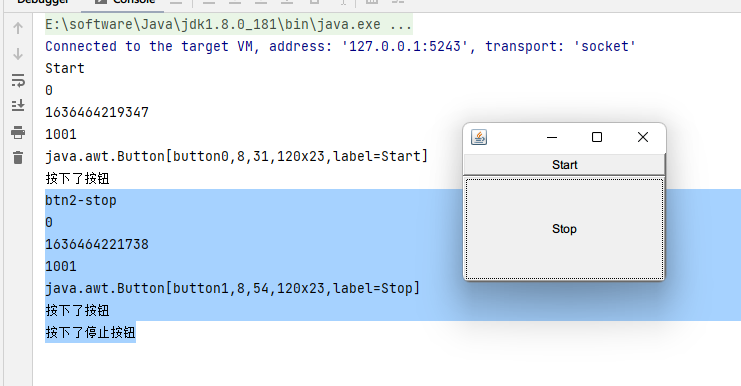
可以多个按钮公用同一个监听事件,也可以一个按钮增加多个监听事件
public class ActionEventTest {
    public static void main(String[] args) {
        //按下按钮触发一些事情
        Frame frame = new Frame();
        closeWindow(frame);

        Button button = new Button("Start");
        Button button2 = new Button("Stop");
        //手动设置ActionCommand,如果不设置,默认就是Label的值
        button2.setActionCommand("btn2-stop");

        frame.add(button,BorderLayout.NORTH);
        frame.add(button2,BorderLayout.CENTER);
        MyTestActionListener myTestActionListener = new MyTestActionListener();
        //两个按钮公用同一个监听事件
        button.addActionListener(myTestActionListener);
        button2.addActionListener(myTestActionListener);

        frame.setVisible(true);
        frame.pack();
    }

    //抽取方法,用于关闭窗口
    private static void closeWindow(Frame frame){......}
}

class MyTestActionListener implements ActionListener{
    @Override
    public void actionPerformed(ActionEvent e) {
        String actionCommand = e.getActionCommand();
        int modifiers = e.getModifiers();
        long when = e.getWhen();
        int id = e.getID();
        Object source = e.getSource();

        System.out.println(actionCommand);
        System.out.println(modifiers);
        System.out.println(when);
        System.out.println(id);
        System.out.println(source);
        System.out.println("按下了按钮");
        //可以通过判断CommandAction的值来执行不同按钮的操作
        if(actionCommand.equals("btn2-stop")){
            System.out.println("按下了停止按钮");
        }
    }
}
输入框事件监听
public class TextFieldTest {
    public static void main(String[] args) {
        new MyFrameTest();
    }
}

class MyFrameTest extends Frame{
    public MyFrameTest(){
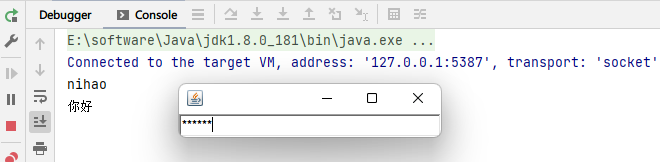
        TextField textField = new TextField();

        add(textField);

        //监听这个文本框输入的内容
        MyTextFieldListener listener = new MyTextFieldListener();
        //当按下回车时会触发这个输入框的事件
        textField.addActionListener(listener);

        //设置替换编码,可用于密码
        textField.setEchoChar('*');

        setVisible(true);
        pack();
    }
}

class MyTextFieldListener implements ActionListener{

    @Override
    public void actionPerformed(ActionEvent e) {
        Object source = e.getSource();
        if(source instanceof TextField){
            TextField textField = (TextField) source;
            String text = textField.getText();
            System.out.println(text);
            textField.setText("");
        }
    }
}
例子:简易计算器
public class TestCalc {
    public static void main(String[] args) {
        new Calculator();
    }
}

class Calculator extends Frame{

    public Calculator(){
        //从左至右,流式布局
        this.setLayout(new FlowLayout());
        this.setVisible(true);
        this.setLocation(new Point(500,500));
        this.addWindowListener(new WindowAdapter() {
            @Override
            public void windowClosing(WindowEvent e) {
                System.out.println("计算器退出");
                System.exit(0);
            }
        });

        init();
        this.pack();
    }

    public void init(){
        TextField num1 = new TextField(10);
        TextField num2 = new TextField(10);
        TextField sum = new TextField(20);
        //标签
        Label opt = new Label("+");

        Button eq = new Button("=");

        this.add(num1);
        this.add(opt);
        this.add(num2);
        this.add(eq);
        this.add(sum);

        eq.addActionListener(new MyActionListener(num1,num2,sum));
    }
}

class MyActionListener implements ActionListener{

    private TextField num1,num2,num3;

    public MyActionListener(TextField num1, TextField num2, TextField num3) {
        this.num1 = num1;
        this.num2 = num2;
        this.num3 = num3;
    }

    @Override
    public void actionPerformed(ActionEvent e) {
        String num1 = this.num1.getText();
        String num2 = this.num2.getText();

        int a = Integer.parseInt(num1);
        int b = Integer.parseInt(num2);

        num3.setText("" + (a+b));
    }
}
鼠标监听事件
示例代码
frame.addMouseListener(new MouseAdapter() {
    //重写鼠标按下的事件
    @Override
    public void mousePressed(MouseEvent e) {
        System.out.println("点击了鼠标");
    }
});
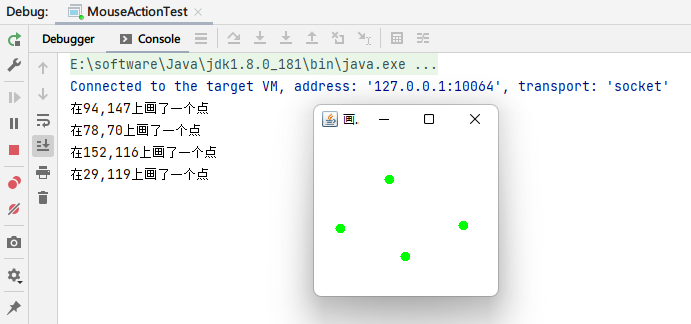
例子:利用鼠标模仿画图工具
public class MouseActionTest {
    public static void main(String[] args) {
        new MyMouseFrame("画图").init();
    }
}

class MyMouseFrame extends Frame{

    //用来记录保存鼠标点击过的点的位置,因为鼠标窗体repaint时需要知道每一个点的位置
    private final java.util.List<Point> points = new ArrayList<>();

    public MyMouseFrame(String title) throws HeadlessException {
        super(title);
    }

    public void init(){
        //添加鼠标监听事件
        this.addMouseListener(new MouseAdapter() {
            //重写鼠标按下的事件
            @Override
            public void mousePressed(MouseEvent e) {
                //当鼠标按下时,记录按下点的位置
                MyMouseFrame myMouseFrame = (MyMouseFrame) e.getSource();
                points.add(e.getPoint());
                System.out.printf("在%d,%d上画了一个点\n",e.getX(),e.getY());
                //使窗体重新绘制点
                myMouseFrame.repaint();
            }
        });

        setBounds(200,200,200,200);
        setVisible(true);
    }

    @Override
    public void paint(Graphics g) {
        //设置画笔颜色
        g.setColor(Color.green);
        //遍历list进行绘画
        for (Point point : points) {
            //画一个实心的小圆,表示一个点
            g.fillOval(point.x,point.y,10,10);
        }
    }
}
窗口监听事件
public class WindowActionTest {
    public static void main(String[] args) {
        Frame frame = new Frame();
        frame.addWindowListener(new WindowAdapter() {

            //窗口打开事件
            @Override
            public void windowOpened(WindowEvent e) {
                System.out.println("WindowOpened");
            }

            //窗口关闭中事件
            @Override
            public void windowClosing(WindowEvent e) {
                System.out.println("windowClosing");
            }

            //窗口关闭后事件
            @Override
            public void windowClosed(WindowEvent e) {
                System.out.println("windowClosed");
            }

            //窗口最小化
            @Override
            public void windowIconified(WindowEvent e) {
                System.out.println("windowIconified");
            }

            //窗口取消最小化
            @Override
            public void windowDeiconified(WindowEvent e) {
                System.out.println("windowDeiconified");
            }

            //窗口激活
            @Override
            public void windowActivated(WindowEvent e) {
                System.out.println("windowActivated");
            }

            //窗口失去焦点
            @Override
            public void windowDeactivated(WindowEvent e) {
                System.out.println("windowDeactivated");
            }

            @Override
            public void windowStateChanged(WindowEvent e) {
                System.out.println("windowStateChanged");
            }

            @Override
            public void windowGainedFocus(WindowEvent e) {
                System.out.println("windowGainedFocus");
            }

            @Override
            public void windowLostFocus(WindowEvent e) {
                System.out.println("windowLostFocus");
            }
        });
        frame.setBounds(200,200,200,200);
        frame.setVisible(true);
    }
}
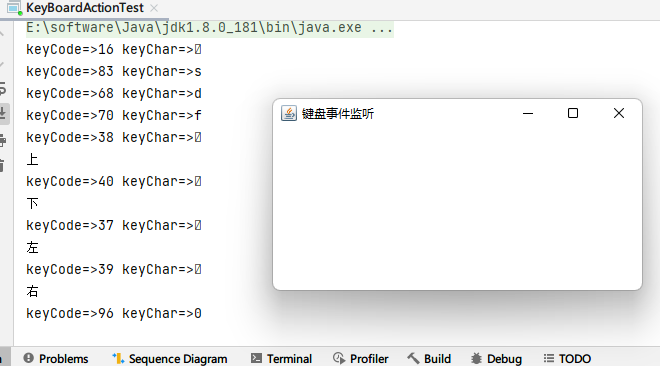
键盘监听事件
public class KeyBoardActionTest {
    public static void main(String[] args) {
        new KeyBoardFrame("键盘事件监听").init();
    }
}

class KeyBoardFrame extends Frame{
    public KeyBoardFrame(String title) throws HeadlessException {
        super(title);
    }

    public void init(){
        //添加键盘监听事件
        addKeyListener(new KeyAdapter() {
            @Override
            public void keyPressed(KeyEvent e) {
                int keyCode = e.getKeyCode();
                char keyChar = e.getKeyChar();
                System.out.println("keyCode=>"+keyCode+" keyChar=>"+keyChar);
                switch (keyCode){
                    case KeyEvent.VK_UP:
                        System.out.println("上");
                        break;
                    case KeyEvent.VK_DOWN:
                        System.out.println("下");
                        break;
                    case KeyEvent.VK_LEFT:
                        System.out.println("左");
                        break;
                    case KeyEvent.VK_RIGHT:
                        System.out.println("右");
                        break;
                }
            }
        });
        setBounds(200,200,200,200);
        setVisible(true);
    }
}