
什么是JUC?
就是包,java.util.concurrent
线程和进程
进程:一个程序,QQ.exe Music.exe,程序的集合 .jar
一个进程往往可以包含多个线程,至少包含一个!
Java默认有几个线程?
2个,Main线程和GC线程
线程:开了一个进程Typora,写字、自动保存是线程负责的
对Java而言 :Thread、Runnable、Callable
Java真的可以开启线程吗?
不可以,只能通过本地方法调用
public synchronized void start() {
    /**
     * This method is not invoked for the main method thread or "system"
     * group threads created/set up by the VM. Any new functionality added
     * to this method in the future may have to also be added to the VM.
     *
     * A zero status value corresponds to state "NEW".
     */
    if (threadStatus != 0)
        throw new IllegalThreadStateException();

    /* Notify the group that this thread is about to be started
     * so that it can be added to the group's list of threads
     * and the group's unstarted count can be decremented. */
    group.add(this);

    boolean started = false;
    try {
        start0();
        started = true;
    } finally {
        try {
            if (!started) {
                group.threadStartFailed(this);
            }
        } catch (Throwable ignore) {
            /* do nothing. If start0 threw a Throwable then
              it will be passed up the call stack */
        }
    }
}

//本地方法,底层的C++,Java无法直接操作
private native void start0();
并发、并行
并发:CPU一核,通过快速交替模拟出来多条线程同时运行,其实每次只有一条线程运行。
并行:CPU多核,多个线程可以同时执行;线程池
public class Test {
    public static void main(String[] args) {
        //获取CPU的核数
        // CPU密集型,IO密集型
        System.out.println(Runtime.getRuntime().availableProcessors());
    }
}
并发编程的本质:充分利用CPU资源
线程的几种状态
一般来说:创建->就绪->运行->阻塞->死亡
源码中:
public enum State {
    // 创建
    NEW,

    // 运行
    RUNNABLE,

    // 阻塞
    BLOCKED,

    // 等待,一直等下去
    WAITING,

    // 超时等待,超时后不再等
    TIMED_WAITING,

    // 终止
    TERMINATED;
}
wait和sleep的区别
- 来自不同的类
wait -> Object
sleep -> Thread
- 关于锁的释放
wait会释放锁,sleep不会释放锁,抱着锁睡觉!
- 使用的范围不同
wait:必须在同步代码块中
sleep:可以在任何地方睡
- 是否需要捕获异常
wait不需要捕获异常,sleep必须要捕获异常
notify与notifyAll、signal与signalAll的区别
notify与notifyAll的区别
notify是从等待池中随机唤醒一个线程,而notifyAll是唤醒所有线程
signal和signalAll的区别
signal是从等待队列中唤醒第一个线程,而signalAll是signal的循环,唤醒所有线程
Lock锁
传统锁Synchronized
public class SaleTicket {
    public static void main(String[] args) {
        Ticket ticket = new Ticket();
        new Thread(()->{ticket.sale();},"A").start();
        new Thread(ticket::sale,"B").start();
        new Thread(ticket::sale,"C").start();
    }
}

class Ticket{
    //票的数量
    private int num = 50;

    public synchronized void sale(){
        while (num > 0) {
            System.out.println(Thread.currentThread().getName() + "卖出了第" + num-- + "张票,剩余:" + num);
            try {
                TimeUnit.MILLISECONDS.sleep(100);
            } catch (InterruptedException e) {
                e.printStackTrace();
            }
        }
    }
}
Lock接口
所有已知实现类
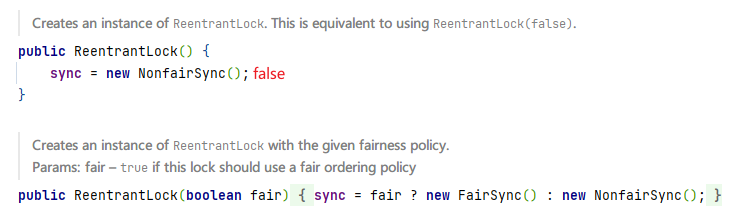
ReentrantLock,可重入锁(常用)
- 公平锁:十分公平,先来后到
- 非公平锁:十分不公平,可以插队(默认)
ReentrantReadWriteLock.ReadLock,读锁
ReentrantReadWriteLock.WriteLock,写锁
public class SaleTicketWithLock {
    public static void main(String[] args) {
        Ticket2 ticket = new Ticket2();
        new Thread(()->{ticket.sale();},"A").start();
        new Thread(ticket::sale,"B").start();
        new Thread(ticket::sale,"C").start();
    }
}

/**
 * Lock三部曲
 * 1. new ReentrantLock();
 * 2. 加锁,lock.lock();
 * 3. 释放锁,lock.unlock();
 */
class Ticket2{
    //票的数量
    private int num = 50;

    //定义锁
    Lock lock = new ReentrantLock();

    public void sale(){
        lock.lock();
        try {
            while (num > 0) {
                System.out.println(Thread.currentThread().getName() + "卖出了第" + num-- + "张票,剩余:" + num);
                try {
                    TimeUnit.MILLISECONDS.sleep(100);
                } catch (InterruptedException e) {
                    e.printStackTrace();
                }
            }
        }finally {
            lock.unlock();
        }
    }
}
Synchronized与Lock的区别
- Synchronized是一个Java内置的关键字,Lock是一个Java类
- Synchronized无法判断获取锁的状态,Lock可以判断是否获取到了锁
- Synchronized会自动释放锁,Lock必须要手动释放锁。如果不释放锁,会出现死锁
- Synchronized,如果线程1获取了锁并阻塞,线程2会一直等待;Lock锁就不一定会等下去
lock.tryLock() - Synchronized可重入锁,不可以中断的,非公平;Lock可重入锁,可以判断 锁,默认非公平(可以自己设置)
- Synchronized适合锁少量的代码同步问题,Lock适合锁大量的同步代码
生产者和消费者问题
Synchronized版
package top.doubly;

public class ProducerAndConsumer {
    public static void main(String[] args) {
        Data data = new Data();
        new Thread(()->{
            for (int i = 0; i < 10; i++) {
                data.increment();
            }
        },"A").start();
        new Thread(()->{
            for (int i = 0; i < 10; i++) {
                data.decrement();
            }
        },"B").start();
    }

}


class Data{
    private int num = 0;

    /**
     * 生产者消费者问题步骤
     * 1. 判断等待
     * 2. 业务
     * 3. 通知
     */
    public synchronized void increment(){
        if(num != 0){
            try {
                this.wait();
            } catch (InterruptedException e) {
                e.printStackTrace();
            }
        }
        num += 1;
        System.out.println(Thread.currentThread().getName() + "=>" + num);
        this.notifyAll();
    }

    /**
     * 生产者消费者问题步骤
     * 1. 判断等待
     * 2. 业务
     * 3. 通知
     */
    public synchronized void decrement(){
        if(num == 0){
            try {
                this.wait();
            } catch (InterruptedException e) {
                e.printStackTrace();
            }
        }
        num -= 1;
        System.out.println(Thread.currentThread().getName() + "=>" + num);
        this.notifyAll();
    }
}
问题存在,A B C D四个线程时,会出现虚假唤醒

解决办法:if改为while
package top.doubly;

public class ProducerAndConsumer {
    public static void main(String[] args) {
        Data data = new Data();
        new Thread(()->{
            for (int i = 0; i < 10; i++) {
                data.increment();
            }
        },"A").start();
        new Thread(()->{
            for (int i = 0; i < 10; i++) {
                data.decrement();
            }
        },"B").start();new Thread(()->{
            for (int i = 0; i < 10; i++) {
                data.increment();
            }
        },"C").start();
        new Thread(()->{
            for (int i = 0; i < 10; i++) {
                data.decrement();
            }
        },"D").start();

    }

}


class Data{
    private int num = 0;

    /**
     * 生产者消费者问题步骤
     * 1. 判断等待
     * 2. 业务
     * 3. 通知
     */
    public synchronized void increment(){
        //System.out.println(Thread.currentThread().getName()+"进入方法");
        while (num != 0){
            try {
                //System.out.println(Thread.currentThread().getName()+"进入等待");
                this.wait();
            } catch (InterruptedException e) {
                e.printStackTrace();
            }
        }
        num += 1;
        System.out.println(Thread.currentThread().getName() + "=>" + num);
        this.notifyAll();
    }

    /**
     * 生产者消费者问题步骤
     * 1. 判断等待
     * 2. 业务
     * 3. 通知
     */
    public synchronized void decrement(){
        //System.out.println(Thread.currentThread().getName()+"进入方法");
        while (num == 0){
            try {
                //System.out.println(Thread.currentThread().getName()+"进入等待");
                this.wait();
            } catch (InterruptedException e) {
                e.printStackTrace();
            }
        }
        num -= 1;
        System.out.println(Thread.currentThread().getName() + "=>" + num);
        this.notifyAll();
    }
}
JUC版
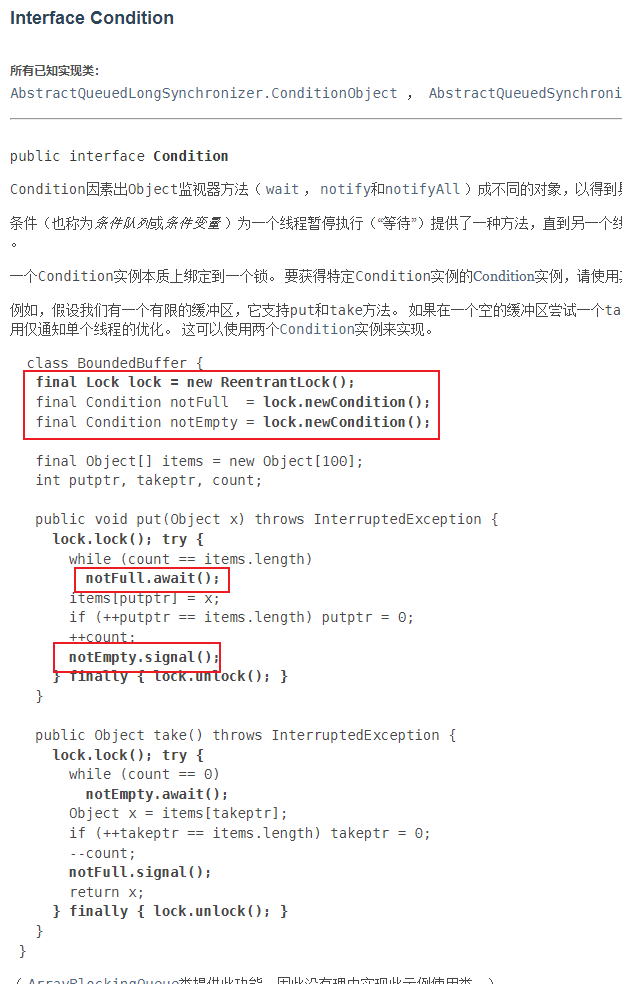
使用await和signal方法代替了Object的监视器方法(wait,notify,notiryAll)
代码实现
package top.doubly;

import java.util.concurrent.locks.Condition;
import java.util.concurrent.locks.Lock;
import java.util.concurrent.locks.ReentrantLock;

public class ProducerAndConsumerWithJUC {
    public static void main(String[] args) {
        Data2 data = new Data2();
        new Thread(()->{
            for (int i = 0; i < 10; i++) {
                data.increment();
            }
        },"A").start();
        new Thread(()->{
            for (int i = 0; i < 10; i++) {
                data.decrement();
            }
        },"B").start();new Thread(()->{
            for (int i = 0; i < 10; i++) {
                data.increment();
            }
        },"C").start();
        new Thread(()->{
            for (int i = 0; i < 10; i++) {
                data.decrement();
            }
        },"D").start();

    }

}


class Data2{
    private int num = 0;

    private Lock lock = new ReentrantLock(false);
    private Condition condition = lock.newCondition();
    /**
     * 生产者消费者问题步骤
     * 1. 判断等待
     * 2. 业务
     * 3. 通知
     */
    public void increment(){
        lock.lock();
        try {
            while (num != 0) {
                try {
                    condition.await();
                } catch (InterruptedException e) {
                    e.printStackTrace();
                }
            }
            num += 1;
            System.out.println(Thread.currentThread().getName() + "=>" + num);
            condition.signalAll();
        }finally {
            lock.unlock();
        }
    }

    /**
     * 生产者消费者问题步骤
     * 1. 判断等待
     * 2. 业务
     * 3. 通知
     */
    public void decrement(){
        lock.lock();
        try {
            while (num == 0) {
                try {
                    condition.await();
                } catch (InterruptedException e) {
                    e.printStackTrace();
                }
            }
            num -= 1;
            System.out.println(Thread.currentThread().getName() + "=>" + num);
            condition.signalAll();
        }finally {
            lock.unlock();
        }
    }
}
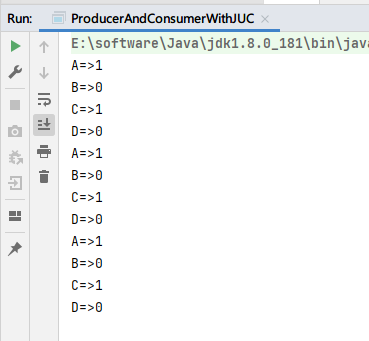
执行结果,虽然num结果是0和1交替执行,但A,B,C,D四个线程乱序执行

任何一个新的技术,绝对不是仅仅只是覆盖了原来的技术,一定会有优势和补充
Condition可以精准的通知和唤醒线程,实现有序的执行A,B,C,D线程
改进:可以new多个Condition区分不同状态
class Data2{
    private int num = 0;

    private Lock lock = new ReentrantLock(false);
    private Condition isZero1 = lock.newCondition();
    private Condition isZero2 = lock.newCondition();
    private Condition notZero1 = lock.newCondition();
    private Condition notZero2 = lock.newCondition();
    //private Condition condition = lock.newCondition();
    /**
     * 生产者消费者问题步骤
     * 1. 判断等待
     * 2. 业务
     * 3. 通知
     */
    public void increment(){
        lock.lock();
        try {
            String threadName = Thread.currentThread().getName();
            if (num != 0) {
                try {
                    //condition.await();
                    if("A".equals(threadName)) {
                        notZero1.await();
                    }else if("C".equals(threadName)){
                        notZero2.await();
                    }
                } catch (InterruptedException e) {
                    e.printStackTrace();
                }
            }
            num += 1;
            System.out.println(threadName + "=>" + num);
            if ("A".equals(threadName)) {
                isZero1.signalAll();
            } else if("C".equals(threadName)){
                isZero2.signalAll();
            }
            //condition.signalAll();
        }finally {
            lock.unlock();
        }
    }

    /**
     * 生产者消费者问题步骤
     * 1. 判断等待
     * 2. 业务
     * 3. 通知
     */
    public void decrement(){
        lock.lock();
        try {
            String threadName = Thread.currentThread().getName();
            while (num == 0) {
                try {
                    //condition.await();
                    if("B".equals(threadName)){
                        isZero1.await();
                    }else if("D".equals(threadName)){
                        isZero2.await();
                    }
                } catch (InterruptedException e) {
                    e.printStackTrace();
                }
            }
            num -= 1;
            System.out.println(threadName + "=>" + num);
            //condition.signalAll();
            if("B".equals(threadName)){
                notZero2.signalAll();
            }else if("D".equals(threadName)){
                notZero1.signalAll();
            }
        }finally {
            lock.unlock();
        }
    }
}
执行结果,A,B,C,D顺序依次执行
8锁现象
- 标准情况下,两个线程先打印发短信还是打电话?
public class Test1 {
    public static void main(String[] args) {
        Phone phone = new Phone();

        new Thread(phone::sendSms).start();

        try {
            TimeUnit.SECONDS.sleep(1);
        } catch (InterruptedException e) {
            e.printStackTrace();
        }

        new Thread(phone::call).start();
    }
}

class Phone{
    public synchronized void sendSms(){
        System.out.println("发短信");
    }

    public synchronized void call(){
        System.out.println("打电话");
    }
}
结果:发短信,打电话
- 发短信线程先休息4s钟,是发短信还是打电话?
public class Test1 {
    public static void main(String[] args) {
        Phone phone = new Phone();

        new Thread(phone::sendSms).start();

        try {
            TimeUnit.SECONDS.sleep(1);
        } catch (InterruptedException e) {
            e.printStackTrace();
        }

        new Thread(phone::call).start();
    }
}

class Phone{
    public synchronized void sendSms() {
        try {
            TimeUnit.SECONDS.sleep(4);
        } catch (InterruptedException e) {
            e.printStackTrace();
        }
        System.out.println("发短信");
    }

    public synchronized void call(){
        System.out.println("打电话");
    }
}
结果:发短信、打电话
synchronized锁的对象是方法的调用者,即phone对象!
两个方法用的是同一个锁,所以谁先拿到谁先执行!
- Phone增加了一个普通方法后,线程B调用hello方法,是先执行发短信还是hello?
public class Test2 {
    public static void main(String[] args) {
        Phone2 phone = new Phone2();

        new Thread(phone::sendSms,"A").start();

        try {
            TimeUnit.SECONDS.sleep(1);
        } catch (InterruptedException e) {
            e.printStackTrace();
        }

        new Thread(phone::hello,"B").start();
    }
}

class Phone2{
    public synchronized void sendSms() {
        try {
            TimeUnit.SECONDS.sleep(4);
        } catch (InterruptedException e) {
            e.printStackTrace();
        }
        System.out.println("发短信");
    }

    public synchronized void call(){
        System.out.println("打电话");
    }

    //这里没有锁
    public void hello(){
        System.out.println("hello");
    }
}
结果:hello,发短信
hello是普通方法,没有加锁,所以不需要获取锁就可以立即执行
- 两个线程使用两个对象执行两个同步方法,先执行发短信还是先打电话?
public class Test2 {
    public static void main(String[] args) {
        Phone2 phone1 = new Phone2();
        Phone2 phone2 = new Phone2();

        new Thread(phone1::sendSms,"A").start();

        try {
            TimeUnit.SECONDS.sleep(1);
        } catch (InterruptedException e) {
            e.printStackTrace();
        }

        new Thread(phone2::call,"B").start();
    }
}

class Phone2{
    public synchronized void sendSms() {
        try {
            TimeUnit.SECONDS.sleep(4);
        } catch (InterruptedException e) {
            e.printStackTrace();
        }
        System.out.println("发短信");
    }

    public synchronized void call(){
        System.out.println("打电话");
    }
}
结果:打电话、发短信
这里是两个不同的调用对象,A线程锁的是phone1,B线程锁的是phone2
- 增加两个静态方法,AB线程调用两个静态方法,是先发短信还是先打电话?
public class Test3 {
    public static void main(String[] args) {
        Phone3 phone = new Phone3();

        new Thread(()->{
            phone.sendSms();
        },"A").start();

        try {
            TimeUnit.SECONDS.sleep(1);
        } catch (InterruptedException e) {
            e.printStackTrace();
        }

        new Thread(()->{
            phone.call();
        },"B").start();
    }
}

class Phone3{
    public static synchronized void sendSms() {
        try {
            TimeUnit.SECONDS.sleep(4);
        } catch (InterruptedException e) {
            e.printStackTrace();
        }
        System.out.println("发短信");
    }

    public static synchronized void call(){
        System.out.println("打电话");
    }
}
结果:发短信
静态同步方法锁的是class对象,class对象全局唯一,所以两个线程竞争同一把锁
- 定义两个对象,分别调用两个静态方法,是先发短信还是先打电话?
public class Test4 {
    public static void main(String[] args) {
        Phone3 phone1 = new Phone3();
        Phone3 phone2 = new Phone3();

        new Thread(()->{
            phone1.sendSms();
        },"A").start();

        try {
            TimeUnit.SECONDS.sleep(1);
        } catch (InterruptedException e) {
            e.printStackTrace();
        }

        new Thread(()->{
            phone2.call();
        },"B").start();
    }
}

class Phone4{
    public static synchronized void sendSms() {
        try {
            TimeUnit.SECONDS.sleep(4);
        } catch (InterruptedException e) {
            e.printStackTrace();
        }
        System.out.println("发短信");
    }

    public static synchronized void call(){
        System.out.println("打电话");
    }
}
结果:发短信、打电话
两个对象的静态同步方法锁的都是Phone的class对象
- 1个静态同步方法,1个普通同步方法,1个对象,先打印发短信还是打电话?
public class Test4 {
    public static void main(String[] args) {
        Phone4 phone1 = new Phone4();

        new Thread(()->{
            phone1.sendSms();
        },"A").start();

        try {
            TimeUnit.SECONDS.sleep(1);
        } catch (InterruptedException e) {
            e.printStackTrace();
        }

        new Thread(()->{
            phone1.call();
        },"B").start();
    }
}

class Phone4{
    public static synchronized void sendSms() {
        try {
            TimeUnit.SECONDS.sleep(4);
        } catch (InterruptedException e) {
            e.printStackTrace();
        }
        System.out.println("发短信");
    }

    public synchronized void call(){
        System.out.println("打电话");
    }
}
结果:打电话、发短信
静态同步方法锁的是class对象,普通同步方法锁的是phone对象,两个线程没有竞争
- 1个静态同步方法,1个普通同步方法,2个对象,先打印发短信还是打电话?
public class Test4 {
    public static void main(String[] args) {
        Phone4 phone1 = new Phone4();
        Phone4 phone2 = new Phone4();

        new Thread(()->{
            phone1.sendSms();
        },"A").start();

        try {
            TimeUnit.SECONDS.sleep(1);
        } catch (InterruptedException e) {
            e.printStackTrace();
        }

        new Thread(()->{
            phone2.call();
        },"B").start();
    }
}

class Phone4{
    public static synchronized void sendSms() {
        try {
            TimeUnit.SECONDS.sleep(4);
        } catch (InterruptedException e) {
            e.printStackTrace();
        }
        System.out.println("发短信");
    }

    public synchronized void call(){
        System.out.println("打电话");
    }
}
结果:打电话、发短信
静态同步方法锁的是class对象,普通同步方法锁的是phone对象,两个线程没有竞争
总结:new this锁的是具体对象,static class锁的是类对象
集合类不安全
List不安全
public class ListTest {
    public static void main(String[] args) {
        List<String> list = new ArrayList<>();

        for (int i = 0; i < 10; i++) {
            new Thread(()->{
                list.add(UUID.randomUUID().toString().substring(0,5));
                System.out.println(list);
            },String.valueOf(i)).start();
        }

    }
}
运行结果,发生异常
[0aa0d, fd313, 170eb]
[0aa0d, fd313, 170eb, 109dc, 8edff, 53ab7, 15bca]
[0aa0d, fd313, 170eb, 109dc, 8edff, 53ab7]
[0aa0d, fd313, 170eb, 109dc, 8edff]
[0aa0d, fd313, 170eb, 109dc]
[0aa0d, fd313, 170eb]
[0aa0d, fd313, 170eb]
[0aa0d, fd313, 170eb, 109dc, 8edff, 53ab7, 15bca, 4322d, d1ca0, 838ac]
[0aa0d, fd313, 170eb, 109dc, 8edff, 53ab7, 15bca, 4322d]
Exception in thread "9" java.util.ConcurrentModificationException
	at java.util.ArrayList$Itr.checkForComodification(ArrayList.java:909)
	at java.util.ArrayList$Itr.next(ArrayList.java:859)
	at java.util.AbstractCollection.toString(AbstractCollection.java:461)
	at java.lang.String.valueOf(String.java:2994)
	at java.io.PrintStream.println(PrintStream.java:821)
	at top.doubly.unsafe.ListTest.lambda$main$0(ListTest.java:15)
	at java.lang.Thread.run(Thread.java:748)

Process finished with exit code 0
java.util.ConcurrentModificationException 并发修改异常
解决方案:
List<String> list = new Vector<>();,Vector从1.0就有,ArrayList从1.2,List<String> list = Collections.synchronizedList(new ArrayList<>());List<String> list = new CopyOnWriteArrayList<>();
CopyOnWriteArrayList
写入时复制,简称COW。计算机程序设计领域的一种优化策略;
Set不安全
public class SetTest {
    public static void main(String[] args) {
        Set<String> set = new HashSet<>();

        for (int i = 0; i < 10; i++) {
            new Thread(()->{
                set.add(UUID.randomUUID().toString());
                System.out.println(set);
            }).start();
        }
    }
}
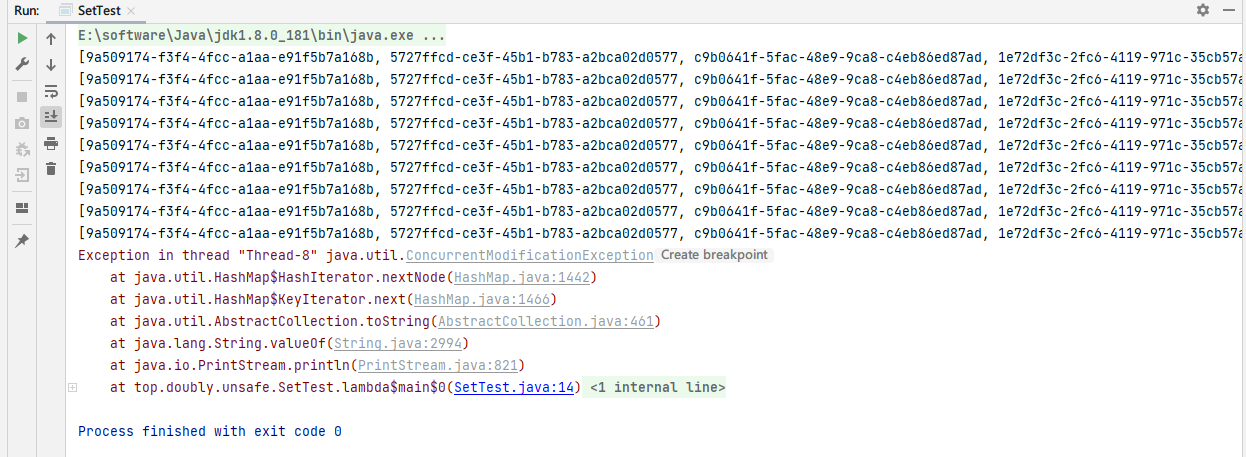
运行时发生异常
解决方案:
Set<String> set = Collections.synchronizedSet(new HashSet<>());Set<String> set = new CopyOnWriteArraySet<>();
HashSet底层
HashSet底层就是一个HashMap,看源码
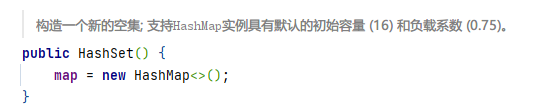
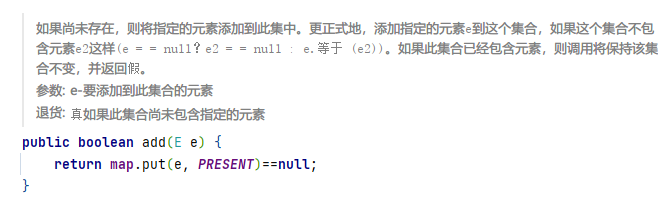

Map不安全
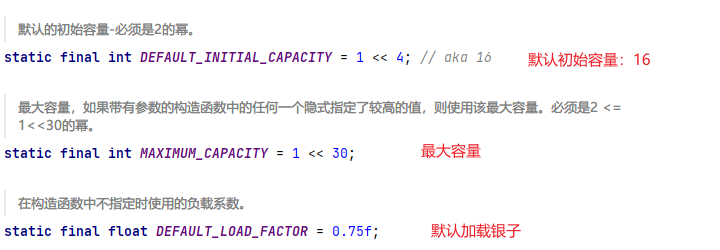
HashMap基础回顾
public class MapTest {
    public static void main(String[] args) {
        Map<String,Object> map = new HashMap<>();
        for (int i = 0; i < 10; i++) {
            new Thread(()->{
                map.put(Thread.currentThread().getName(), UUID.randomUUID().toString());
                System.out.println(map);
            }).start();
        }
    }
}
运行同样出现异常
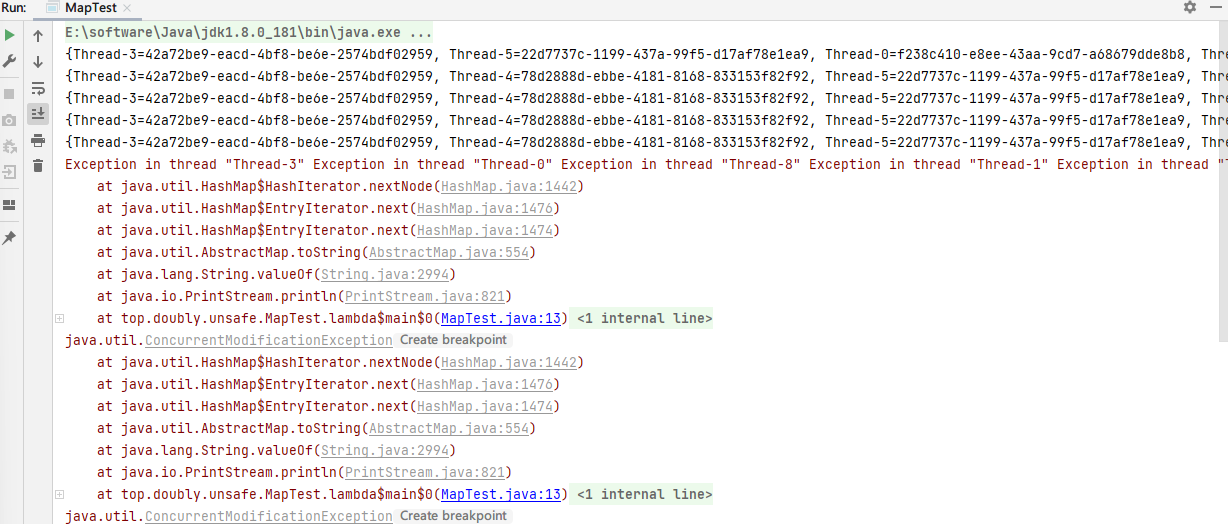
解决方法:
Map<String,Object> map = Collections.synchronizedMap(new HashMap<>());Map<String,Object> map = new ConcurrentHashMap<>();
ConcurrentHashMap原理
Callable
- 可以有返回值
- 可以抛出异常
- 方法不同,run()/call()
public class CallableTest {

    public static void main(String[] args) {
        MyCallable myCallable = new MyCallable();
        FutureTask<String> futureTask = new FutureTask<>(myCallable);
        new Thread(futureTask).start();
        String s = null;
        try {
            s = futureTask.get();
        } catch (InterruptedException e) {
            e.printStackTrace();
        } catch (ExecutionException e) {
            e.printStackTrace();
        }
        System.out.println("获取"+s);
    }

}

class MyCallable implements Callable<String>{

    @Override
    public String call() throws Exception {
        System.out.println("call()");
        return "test";
    }
}
注意:
futureTask.get()方法会产生阻塞,一般会将get方法写在最后,活着使用异步通信
public static void main(String[] args) {
    MyCallable myCallable = new MyCallable();
    FutureTask<String> futureTask = new FutureTask<>(myCallable);
    new Thread(futureTask,"A").start();
    new Thread(futureTask,"B").start();
    String s = futureTask.get();
    System.out.println("获取"+s);
}
两个线程执行一个callable,只会被执行一次,结果会被缓存
常用的辅助类
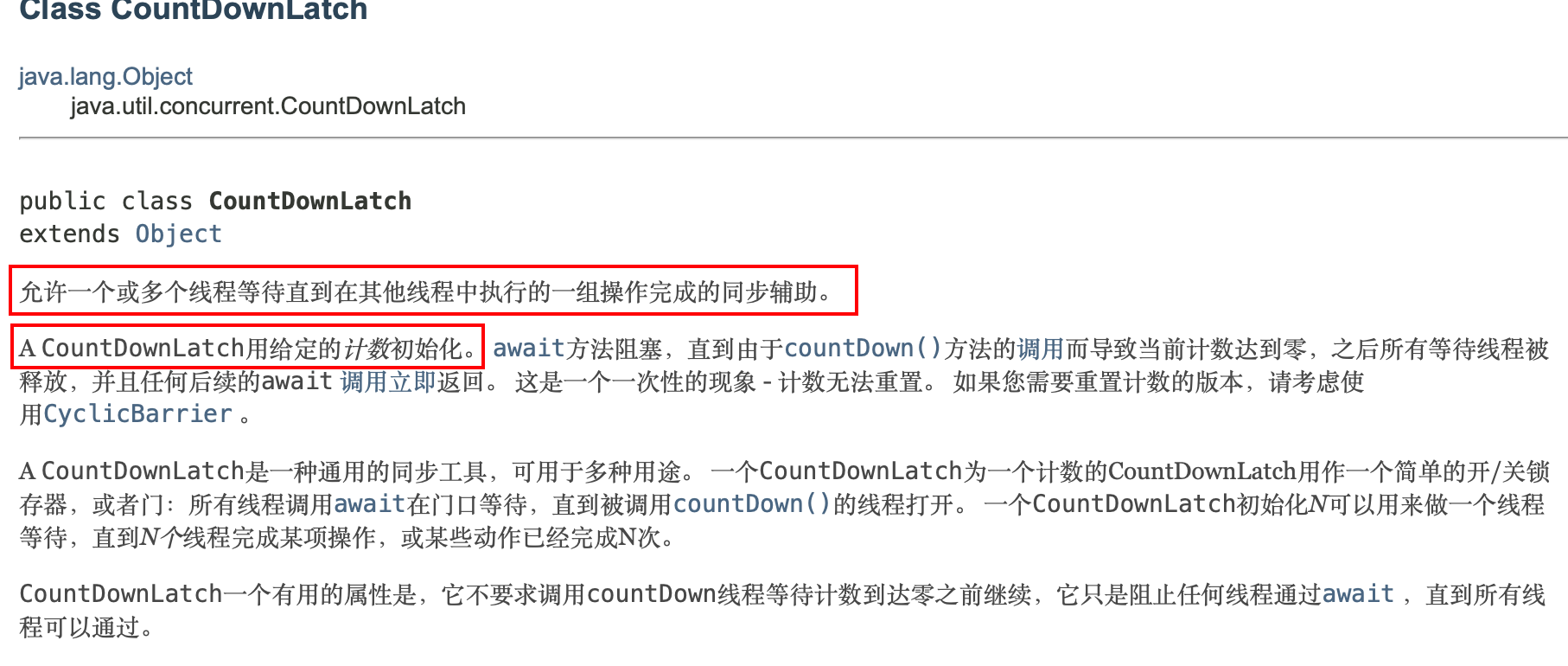
CountDownLatch
计数辅助工具类,当计数为0时,线程才会继续向下执行。一般在必须要执行任务的时候使用
public class CountDownLatchDemo {
    public static void main(String[] args) throws InterruptedException {
        //总数是6
        CountDownLatch countDownLatch = new CountDownLatch(6);

        for (int i = 0; i < 6; i++) {
            new Thread(()->{
                System.out.println(Thread.currentThread().getName()+" Go out");
                //数量-1
                countDownLatch.countDown();
            },String.valueOf(i)).start();
        }
		//等待计数器归零,然后再向下执行
        countDownLatch.await();

        System.out.println("Close Door");
    }
}
原理:
countDownLatch.countDown();进行数量-1
countDownLatch.await();等待计数器归零,然后再向下执行
每次有线程调用countDown()数量-1,假设计数器变为0,countDownLatch.await();就会被唤醒
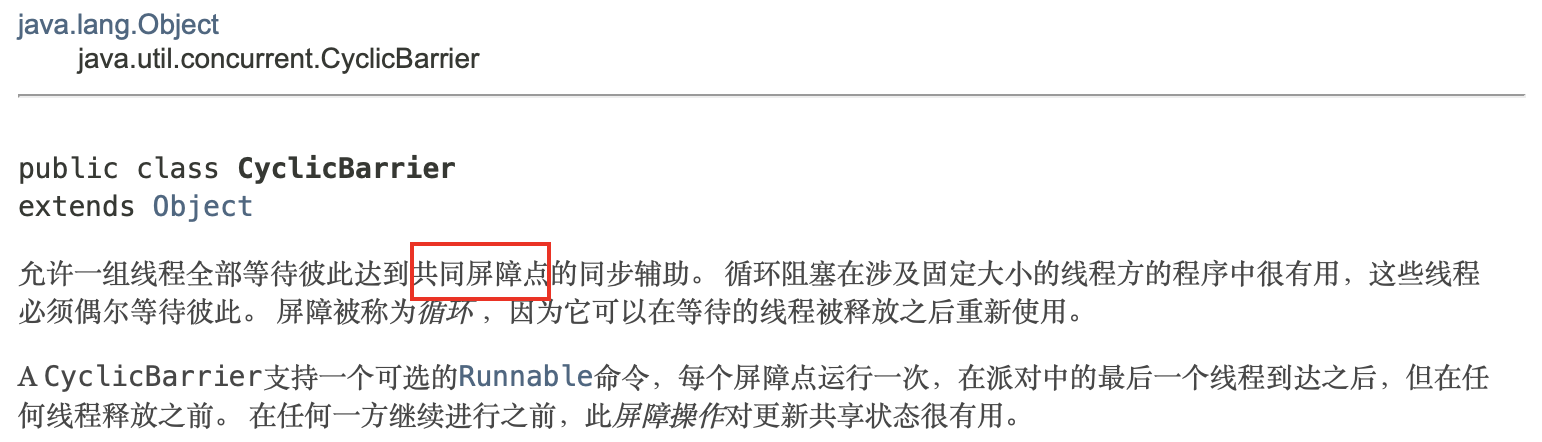
CyclicBarrier
加法计数器
public class CyclicBarrierDemo {

    public static void main(String[] args) {
        CyclicBarrier cyclicBarrier = new CyclicBarrier(7, () -> {
            System.out.println("神龙召唤成功");
        });
        for (int i = 0; i < 7; i++) {
            final int temp = i;
            new Thread(()->{
                System.out.println(Thread.currentThread().getName()+"集齐第"+temp+"颗龙珠");
                try {
                    //等待,直到计数器计数完成才能继续执行
                    cyclicBarrier.await();
                } catch (InterruptedException | BrokenBarrierException e) {
                    e.printStackTrace();
                }
                System.out.println(Thread.currentThread().getName());
            }).start();
        }
    }

}
输出
Thread-0集齐第0颗龙珠
Thread-4集齐第4颗龙珠
Thread-3集齐第3颗龙珠
Thread-1集齐第1颗龙珠
Thread-6集齐第6颗龙珠
Thread-2集齐第2颗龙珠
Thread-5集齐第5颗龙珠
神龙召唤成功
Thread-5
Thread-4
Thread-0
Thread-2
Thread-6
Thread-1
Thread-3
如果计数器设置了8,而计数器只计数到了7,程序就会一直等待。
使用cyclicBarrier.await(10, TimeUnit.SECONDS);可以防止一直等待的情况,超时后会抛出异常。
Semaphore
信号量
一个计数信号量。 在概念上,信号量维持一组许可证。 如果有必要,每个
acquire()都会阻塞,直到许可证可用,然后才能使用它。 每个release()添加许可证,潜在地释放阻塞获取方。 但是,没有使用实际的许可证对象;Semaphore只保留可用数量的计数,并相应地执行。信号量通常用于限制线程数,而不是访问某些(物理或逻辑)资源。
抢车位的例子:
7辆车抢3个车位,只有前面的车出来之后,后面的车才可以抢到车位
public class SemaphoreDemo {
    public static void main(String[] args) {
        Semaphore semaphore = new Semaphore(3);
        for (int i = 0; i < 7; i++) {
            new Thread(() -> {
                try {
                    semaphore.acquire();
                    System.out.println(Thread.currentThread().getName() + "抢到了车位");
                    TimeUnit.SECONDS.sleep(3);
                    System.out.println(Thread.currentThread().getName() + "离开了车位");
                } catch (InterruptedException e) {
                    e.printStackTrace();
                } finally {
                    semaphore.release();
                }
            }).start();
        }
    }
}
输出
Thread-1抢到了车位
Thread-2抢到了车位
Thread-0抢到了车位
Thread-2离开了车位
Thread-1离开了车位
Thread-0离开了车位
Thread-3抢到了车位
Thread-4抢到了车位
Thread-5抢到了车位
Thread-5离开了车位
Thread-3离开了车位
Thread-4离开了车位
Thread-6抢到了车位
Thread-6离开了车位
原理
semaphore.acquire();:获得许可证,假如已经满了,则进行等待,等待许可证被释放为止
semaphore.release();:释放许可证,会将当前的信号量释放+1,然后唤醒等待的线程。
作用
- 多个共享资源互斥的使用
- 并发限流,控制最大的线程数
读写锁
public interface ReadWriteLock
一个 ReadWriteLock维护一对关联的locks ,一个用于只读操作,一个用于写入。 read lock可以由多个阅读器线程同时进行,只要没有作者。 write lock是独家的。
模拟缓存同时读取的情况。高速缓存需要不可以同时写,但可以同时读,以提高效率
public class ReadWriteLockDemo {
    public static void main(String[] args) {
        MyCache3 myCache = new MyCache3();

        for (int i = 0; i < 5; i++) {
            final int temp = i;
            new Thread(()->{
                myCache.put(String.valueOf(temp),temp);
            }).start();
        }

        for (int i = 0; i < 5; i++) {
            final int temp = i;
            new Thread(()->{
                myCache.get(String.valueOf(temp));
            }).start();
        }
    }
}

//无锁的情况下,多个线程会出现同时写入的情况,显然时不行的
class MyCache1{
    private final Map<String,Object> map = new HashMap<>();

    public void put(String key,Object value){
        System.out.println(Thread.currentThread().getName()+"开始写入"+key);
        map.put(key,value);
        System.out.println(Thread.currentThread().getName()+"写入结束");
    }

    public Object get(String key){
        System.out.println(Thread.currentThread().getName()+"开始读取"+key);
        Object o = map.get(key);
        System.out.println(Thread.currentThread().getName()+"读取结束");
        return o;
    }
}

//只给写入加锁的情况下,会出现写入时数据被读取的情况,脏读也是不被允许的
class MyCache2{
    private final Map<String,Object> map = new HashMap<>();

    public synchronized void put(String key,Object value){
        System.out.println(Thread.currentThread().getName()+"开始写入");
        map.put(key,value);
        System.out.println(Thread.currentThread().getName()+"写入结束");
    }

    public Object get(String key){
        System.out.println(Thread.currentThread().getName()+"开始读取");
        Object o = map.get(key);
        System.out.println(Thread.currentThread().getName()+"读取结束");
        return o;
    }
}

//使用读写锁,就可以保证写的时候只有一个线程,读的时候可以多个线程同时读取。并且写的时候不可以读取。
class MyCache3{
    private final Map<String,Object> map = new HashMap<>();

    private ReadWriteLock readWriteLock = new ReentrantReadWriteLock();

    public void put(String key,Object value){
        //写锁加锁
        readWriteLock.writeLock().lock();
        try {
            System.out.println(Thread.currentThread().getName() + "开始写入");
            map.put(key, value);
            System.out.println(Thread.currentThread().getName() + "写入结束");
        } finally {
            //写锁释放锁
            readWriteLock.writeLock().unlock();
        }
    }

    public Object get(String key){
        //读锁加锁
        readWriteLock.readLock().lock();
        Object o;
        try {
            System.out.println(Thread.currentThread().getName() + "开始读取");
            o = map.get(key);
            System.out.println(Thread.currentThread().getName() + "读取结束");
        }finally {
            //读锁释放锁
            readWriteLock.readLock().unlock();
        }
        return o;
    }
}
独占锁(写锁):一次只能一个线程占有
共享锁(读锁):一次可以多个线程占有
ReadWriteLock
读-读:可以共存
写-写:不可以共存
读-写:不可以共存
阻塞队列
队列
先进先出,FIFO。写:往队列插入元素;读:从队列取出元素
阻塞
写入时阻塞:当队列已经满了,就会阻塞
读取时阻塞:当队列为空时,就会阻塞
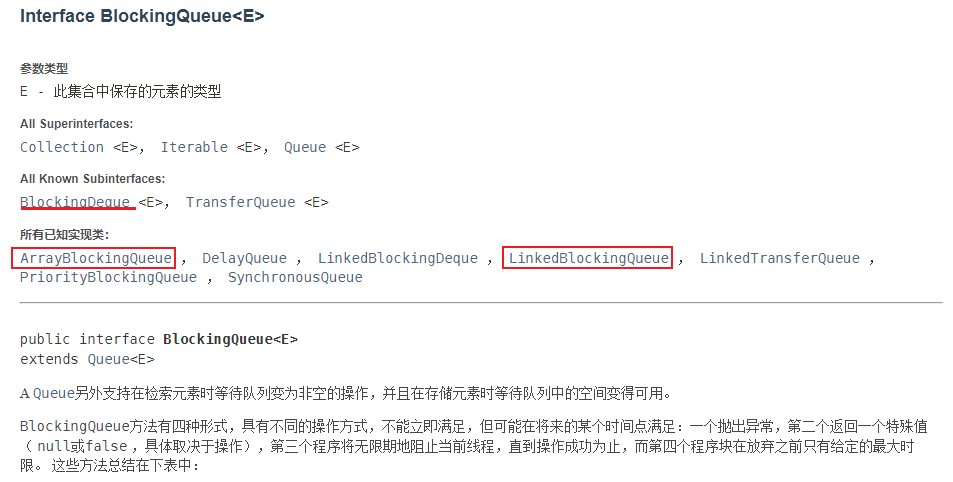
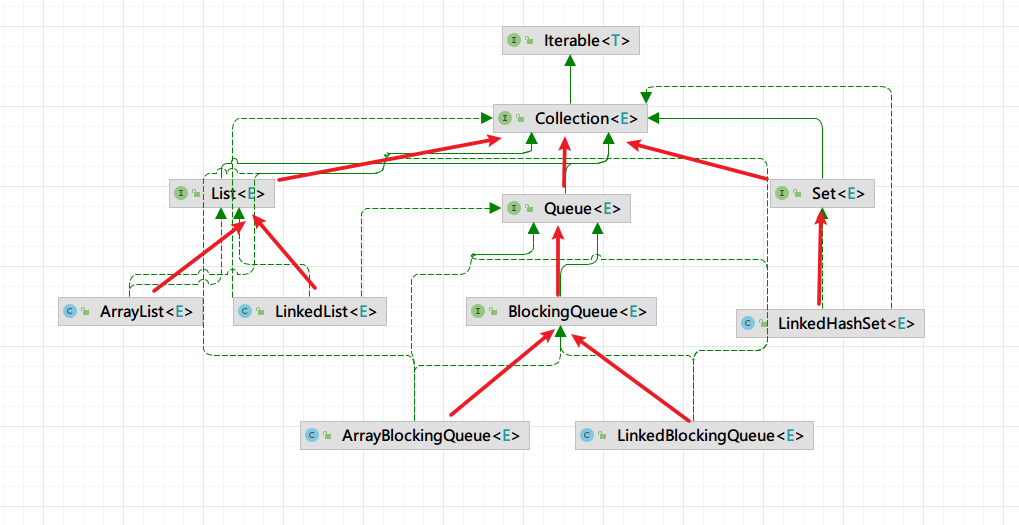
阻塞队列:BlockingQueue
双端队列:Deque,即队列两头可操作
四组API操作
| 操作 | 抛出异常 | 有返回值,不抛出异常 | 阻塞,等待 | 超时等待 |
|---|---|---|---|---|
| 插入 | add | offer | put | offer(,,) |
| 删除 | remove | poll | take | poll(,) |
| 检测队首元素 | element | peek | - | - |
抛出异常
- 当队列已满时,插入元素抛出异常
- 当队列为空时,取出元素抛出异常
- 当队列为空时,获取队首元素抛出异常
public static void test1(){
    System.out.println(arrayBlockingQueue.add("1"));
    System.out.println(arrayBlockingQueue.add("2"));
    System.out.println(arrayBlockingQueue.add("3"));

    //当队列已满的时候会抛出异常
    //System.out.println(arrayBlockingQueue.add("4"));

    System.out.println(arrayBlockingQueue.remove());
    System.out.println(arrayBlockingQueue.remove());
    System.out.println(arrayBlockingQueue.remove());

    //当队列为空的时候,会抛出异常
    //System.out.println(arrayBlockingQueue.remove());

    //获取队首元素,当队首为空时,抛出异常
    System.out.println(arrayBlockingQueue.element());
}
不抛异常
- 当队列已满时,插入元素返回false
- 当队列为空时,取出元素返回null
- 当队列为空时,获取队首元素返回null
public static void test2(){
    System.out.println(arrayBlockingQueue.offer("1"));
    System.out.println(arrayBlockingQueue.offer("2"));
    System.out.println(arrayBlockingQueue.offer("3"));
    //当阻塞队列已满时,返回false,不抛出异常
    System.out.println(arrayBlockingQueue.offer("4"));

    System.out.println(arrayBlockingQueue.poll());
    System.out.println(arrayBlockingQueue.poll());
    System.out.println(arrayBlockingQueue.poll());
    //当阻塞队列为空时,返回null,不抛出异常
    System.out.println(arrayBlockingQueue.poll());

    //获取队首元素,当队首为空时,返回null
    System.out.println(arrayBlockingQueue.peek());
}
等待
- 当队列已满时,插入元素一直处于等待状态
- 当队列为空时,取出元素一直处于等待状态
在等待过程中,有其他线程插入新元素或取出新元素,程序将正常进行取出或插入操作
public static void test3() throws InterruptedException {
    arrayBlockingQueue.put("1");
    arrayBlockingQueue.put("2");
    arrayBlockingQueue.put("3");
    //当队列已满时,将一直处于等待状态
    //arrayBlockingQueue.put("4");

    System.out.println(arrayBlockingQueue.take());
    System.out.println(arrayBlockingQueue.take());
    System.out.println(arrayBlockingQueue.take());

    /*new Thread(()->{
        try {
            TimeUnit.SECONDS.sleep(5);
        } catch (InterruptedException e) {
            e.printStackTrace();
        }
        arrayBlockingQueue.add("4");
        System.out.println(Thread.currentThread().getName()+"向队列中插入新元素");
    }).start();*/

    //当队列为空时,将一直处于阻塞状态
    System.out.println(arrayBlockingQueue.take());
}
超时等待
- 当队列已满时,插入元素等待指定时间后返回false
- 当队列为空时,取出元素等待指定时间后返回null
当其他线程取出或插入数据后,程序将继续正常执行,并返回true或队首元素
public static void test4() throws InterruptedException {
    System.out.println(arrayBlockingQueue.offer("1"));
    System.out.println(arrayBlockingQueue.offer("2"));
    System.out.println(arrayBlockingQueue.offer("3"));
    //超时等待,当队列已满后,等待一段时间,超时后将返回false
    System.out.println(arrayBlockingQueue.offer("4",3,TimeUnit.SECONDS));

    System.out.println(arrayBlockingQueue.poll());
    System.out.println(arrayBlockingQueue.poll());
    System.out.println(arrayBlockingQueue.poll());
    //超时等待,当队列为空时,等待一段时间后,将超时返回null
    System.out.println(arrayBlockingQueue.poll(3, TimeUnit.SECONDS));
}
SynchronousQueue同步队列
同步队列没有容量,不存储元素
放进去一个元素后,必须等待取出来后,才能再往里面放元素
public static void main(String[] args) {

    SynchronousQueue<String> synchronousQueue = new SynchronousQueue<>();

    new Thread(()->{
        try {
            System.out.println(Thread.currentThread().getName()+"添加元素1");
            synchronousQueue.put("1");
            System.out.println(Thread.currentThread().getName()+"添加元素2");
            synchronousQueue.put("2");
            System.out.println(Thread.currentThread().getName()+"添加元素3");
            synchronousQueue.put("3");
        } catch (InterruptedException e) {
            e.printStackTrace();
        }
    }).start();


    new Thread(()->{
        try {
            TimeUnit.SECONDS.sleep(3);
            System.out.println(Thread.currentThread().getName()+"获取元素"+synchronousQueue.take());
            TimeUnit.SECONDS.sleep(3);
            System.out.println(Thread.currentThread().getName()+"获取元素"+synchronousQueue.take());
            TimeUnit.SECONDS.sleep(3);
            System.out.println(Thread.currentThread().getName()+"获取元素"+synchronousQueue.take());
        } catch (InterruptedException e) {
            e.printStackTrace();
        }
    }).start();
}
运行结果
Thread-0添加元素1
Thread-1获取元素1
Thread-0添加元素2
Thread-1获取元素2
Thread-0添加元素3
Thread-1获取元素3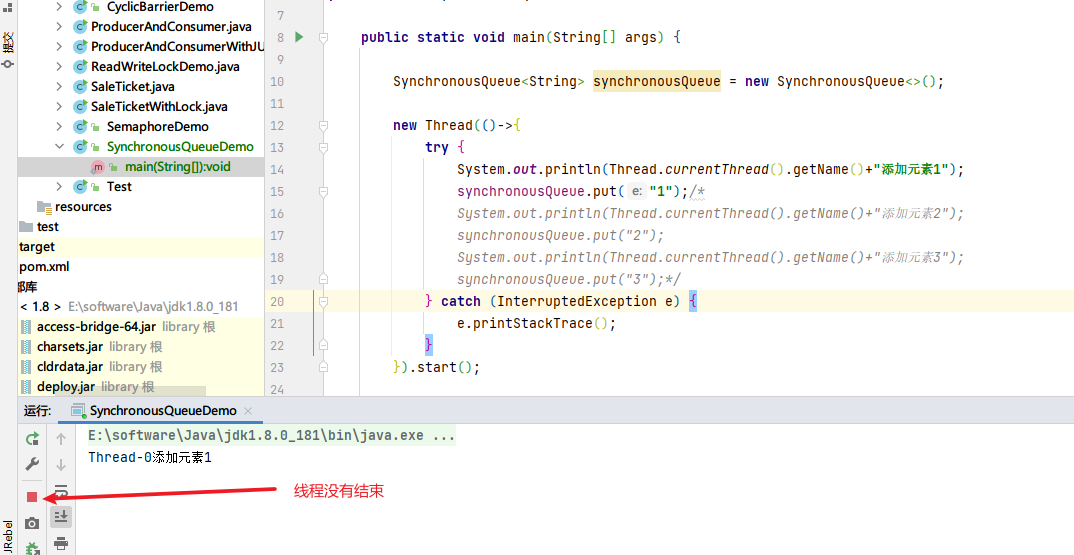
从结果中可以看出,同步队列必须要在配对之后(即一个存,一个取),写入的线程和读取的线程才会正常结束。
线程池(重点)
池化技术
事先准备好一些资源,如果有人要用,就来池中拿来用,用完之后归还
线程池、连接池、内存池、对象池。。。
线程池的好处
- 降低资源的消耗
- 提高响应的速度
- 方便管理
线程复用、可以控制最大并发数、管理线程
3大方法、7大参数、4种拒绝策略
3大方法
public static void main(String[] args) {
    //创建只有单个线程的线程池
    ExecutorService threadPool = Executors.newSingleThreadExecutor();
    //创建固定线程个数的线程池
    ExecutorService threadPool = Executors.newFixedThreadPool(5);
    //可伸缩的,线程数量可变的。CPU足够强时,则可以容纳更多线程
    ExecutorService threadPool = Executors.newCachedThreadPool();
    try {
        for (int i = 0; i < 100; i++) {
            threadPool.execute(() -> {
                System.out.println(Thread.currentThread().getName() + " OK");
            });
        }
    }finally {
        //程序运行结束,需要关闭线程池
        threadPool.shutdown();
    }
}
创建只有单个线程的线程池
ExecutorService threadPool = Executors.newSingleThreadExecutor();pool-1-thread-1 OK pool-1-thread-1 OK pool-1-thread-1 OK pool-1-thread-1 OK pool-1-thread-1 OK pool-1-thread-1 OK pool-1-thread-1 OK pool-1-thread-1 OK pool-1-thread-1 OK pool-1-thread-1 OK创建固定线程个数的线程池
ExecutorService threadPool = Executors.newFixedThreadPool(5);pool-1-thread-1 OK pool-1-thread-4 OK pool-1-thread-5 OK pool-1-thread-3 OK pool-1-thread-2 OK pool-1-thread-3 OK pool-1-thread-5 OK pool-1-thread-4 OK pool-1-thread-1 OK pool-1-thread-2 OK可伸缩的,线程数量可变的。CPU足够强时,则可以创建更多线程
ExecutorService threadPool = Executors.newCachedThreadPool();pool-1-thread-1 OK pool-1-thread-4 OK pool-1-thread-3 OK pool-1-thread-2 OK pool-1-thread-6 OK pool-1-thread-5 OK pool-1-thread-7 OK pool-1-thread-8 OK pool-1-thread-9 OK pool-1-thread-10 OK
7大参数
newSingleThreadExecutor方法
public static ExecutorService newSingleThreadExecutor() {
    return new FinalizableDelegatedExecutorService
        (new ThreadPoolExecutor(1, 1,
                                0L, TimeUnit.MILLISECONDS,
                                new LinkedBlockingQueue<Runnable>()));
}
newFixedThreadPool方法
public static ExecutorService newFixedThreadPool(int nThreads) {
    return new ThreadPoolExecutor(nThreads, nThreads,
                                  0L, TimeUnit.MILLISECONDS,
                                  new LinkedBlockingQueue<Runnable>());
}
newCachedThreadPool方法
public static ExecutorService newCachedThreadPool() {
    return new ThreadPoolExecutor(0, Integer.MAX_VALUE,  //约21亿个线程,会造成OOM
                                  60L, TimeUnit.SECONDS,
                                  new SynchronousQueue<Runnable>());
}
通过查看三种创建线程的方法可以得知,其实都是new了ThreadPoolExecutor,那么在ThreadPoolExecutor的构造方法中,就可以看到7大参数了。
public ThreadPoolExecutor(int corePoolSize,			//核心线程大小
                          int maximumPoolSize,	//最大线程大小
                          long keepAliveTime,		//空闲存活时间
                          TimeUnit unit,				//时间单位
                          BlockingQueue<Runnable> workQueue,	//阻塞队列
                          ThreadFactory threadFactory,				//线程工厂
                          RejectedExecutionHandler handler) {	//拒绝策略
    if (corePoolSize < 0 ||
        maximumPoolSize <= 0 ||
        maximumPoolSize < corePoolSize ||
        keepAliveTime < 0)
        throw new IllegalArgumentException();
    if (workQueue == null || threadFactory == null || handler == null)
        throw new NullPointerException();
    this.acc = System.getSecurityManager() == null ?
            null :
            AccessController.getContext();
    this.corePoolSize = corePoolSize;
    this.maximumPoolSize = maximumPoolSize;
    this.workQueue = workQueue;
    this.keepAliveTime = unit.toNanos(keepAliveTime);
    this.threadFactory = threadFactory;
    this.handler = handler;
}
参数解释
- corePoolSize:核心线程大小,线程池创建后就创建的线程个数
- maximumPoolSize:最大线程大小,线程池创建的最大线程个数
- keepAliveTime:空闲存活时间,核心线程以外的线程多久没有执行任务之后,将进行线程的资源回收,释放线程
- Unit:时间单位
- workQueue:阻塞队列,用于存放等待执行的任务
- threadFactory:线程工厂,创建新线程时使用的工厂
- handler:拒绝策略,线程池达到最大线程并且阻塞队列已满后,再添加执行任务时的决绝策略
线程池创建后,首先创建核心线程大小的线程数;新加进来的任务存在阻塞队列中,当阻塞队列满了之后,线程池开启新的线程执行任务,直到线程数量达到最大线程数。当达到最大线程数量之后,阻塞队列再次满了之后,将使用给定的拒绝策略来拒绝新加入的任务。
手动new一个线程池
public static void main(String[] args) {

    ThreadPoolExecutor threadPool = new ThreadPoolExecutor(
            2,			//核心线程数
            5,			//最大线程数
            10,			//空闲存活时间
            TimeUnit.SECONDS,	//时间单位
            new LinkedBlockingQueue<>(3),	//阻塞队列,用于存放任务
            Executors.defaultThreadFactory(), 	//线程工厂
            new ThreadPoolExecutor.AbortPolicy()//拒绝策略
    );


    try {
        for (int i = 0; i < 9; i++) {
            threadPool.execute(() -> {
                System.out.println(Thread.currentThread().getName() + " OK");
            });
        }
    }finally {
        //程序运行结束,需要关闭线程池
        threadPool.shutdown();
    }


}
当线程数(即上面代码中的i)为2时,使用核心线程执行任务
pool-1-thread-1 OK
pool-1-thread-2 OK
当线程数为3-5时,使用核心线程执行任务,并将新的任务放在等待队列中
pool-1-thread-1 OK
pool-1-thread-2 OK
pool-1-thread-1 OK
pool-1-thread-2 OK
pool-1-thread-1 OK
当线程数为6-8时,开启新的线程执行任务,直到达最大线程数
pool-1-thread-1 OK
pool-1-thread-3 OK
pool-1-thread-1 OK
pool-1-thread-2 OK
pool-1-thread-1 OK
pool-1-thread-3 OK
pool-1-thread-5 OK
pool-1-thread-4 OK当线程数超过8时,在最大线程数+等待队列大小个任务之后加入的任务,抛出异常(这里根据拒绝策略执行,下面讲)
pool-1-thread-1 OK
pool-1-thread-3 OK
pool-1-thread-1 OK
pool-1-thread-2 OK
pool-1-thread-5 OK
pool-1-thread-1 OK
pool-1-thread-3 OK
pool-1-thread-4 OK
Exception in thread "main" java.util.concurrent.RejectedExecutionException: Task top.doubly.threadPool.ThreadPoolDemo01$$Lambda$1/381259350@3feba861 rejected from java.util.concurrent.ThreadPoolExecutor@5b480cf9[Running, pool size = 5, active threads = 0, queued tasks = 0, completed tasks = 8]
	at java.util.concurrent.ThreadPoolExecutor$AbortPolicy.rejectedExecution(ThreadPoolExecutor.java:2063)
	at java.util.concurrent.ThreadPoolExecutor.reject(ThreadPoolExecutor.java:830)
	at java.util.concurrent.ThreadPoolExecutor.execute(ThreadPoolExecutor.java:1379)
	at top.doubly.threadPool.ThreadPoolDemo01.main(ThreadPoolDemo01.java:28)
4大拒绝策略

AbortPolicy
抛出异常
ThreadPoolExecutor threadPool = new ThreadPoolExecutor(
        2,
        5,
        10,
        TimeUnit.SECONDS,
        new LinkedBlockingQueue<>(3),
        Executors.defaultThreadFactory(),
        new ThreadPoolExecutor.AbortPolicy()
);
pool-1-thread-1 OK
pool-1-thread-3 OK
pool-1-thread-1 OK
pool-1-thread-2 OK
pool-1-thread-5 OK
pool-1-thread-1 OK
pool-1-thread-3 OK
pool-1-thread-4 OK
Exception in thread "main" java.util.concurrent.RejectedExecutionException: Task top.doubly.threadPool.ThreadPoolDemo01$$Lambda$1/381259350@3feba861 rejected from java.util.concurrent.ThreadPoolExecutor@5b480cf9[Running, pool size = 5, active threads = 0, queued tasks = 0, completed tasks = 8]
at java.util.concurrent.ThreadPoolExecutor$AbortPolicy.rejectedExecution(ThreadPoolExecutor.java:2063)
at java.util.concurrent.ThreadPoolExecutor.reject(ThreadPoolExecutor.java:830)
at java.util.concurrent.ThreadPoolExecutor.execute(ThreadPoolExecutor.java:1379)
at top.doubly.threadPool.ThreadPoolDemo01.main(ThreadPoolDemo01.java:28)
CallerRunsPolicy
哪来的任务回哪儿去,交给原来的线程去执行
ThreadPoolExecutor threadPool = new ThreadPoolExecutor(
        2,
        5,
        10,
        TimeUnit.SECONDS,
        new LinkedBlockingQueue<>(3),
        Executors.defaultThreadFactory(),
        new ThreadPoolExecutor.CallerRunsPolicy()
);
pool-1-thread-3 OK
pool-1-thread-2 OK
pool-1-thread-4 OK
pool-1-thread-1 OK
# main方法执行
main OK
pool-1-thread-5 OK
pool-1-thread-3 OK
pool-1-thread-2 OK
pool-1-thread-4 OKDiscardPolicy
丢弃任务,不抛出异常
ThreadPoolExecutor threadPool = new ThreadPoolExecutor(
        2,
        5,
        10,
        TimeUnit.SECONDS,
        new LinkedBlockingQueue<>(3),
        Executors.defaultThreadFactory(),
        new ThreadPoolExecutor.DiscardPolicy()
);
#丢弃了一个任务,没有执行
pool-1-thread-2 OK
pool-1-thread-3 OK
pool-1-thread-1 OK
pool-1-thread-5 OK
pool-1-thread-4 OK
pool-1-thread-3 OK
pool-1-thread-1 OK
pool-1-thread-2 OKDiscardOldestPolicy
和最老的线程竞争,竞争成功则执行,竞争失败则丢弃,不抛出异常
ThreadPoolExecutor threadPool = new ThreadPoolExecutor(
        2,
        5,
        10,
        TimeUnit.SECONDS,
        new LinkedBlockingQueue<>(3),
        Executors.defaultThreadFactory(),
        new ThreadPoolExecutor.DiscardOldestPolicy()
);
线程池的最大线程池如何设置(调优)
两种设置方法:
- CPU密集型
- IO密集型
CPU密集型
根据CPU的最大核数,设置最大的线程数。保证CPU最大效率运行。
//获取当前CPU的核心数量
System.out.println(Runtime.getRuntime().availableProcessors());
IO密集型
获取当前任务中比较占用IO的任务个数,大于等于该数,保证不会阻塞
函数式接口
只有一个方法的接口叫做函数式接口
四大原生函数接口
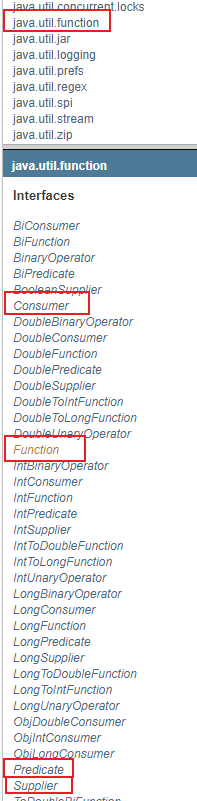
Function
函数型接口
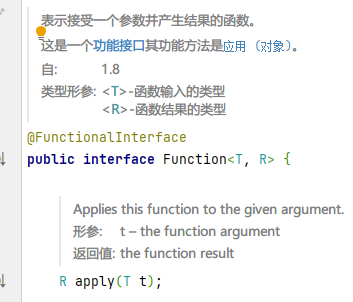
public static void main(String[] args) {
    /*Function<String, String> function = new Function<String, String>() {
        @Override
        public String apply(String s) {
            return s;
        }
    };*/
    //Function<String, String> function = (str) -> {return str;};
    Function<String, String> function = str -> str;
    System.out.println(function.apply("sdf"));
}
Predicate
断定型接口
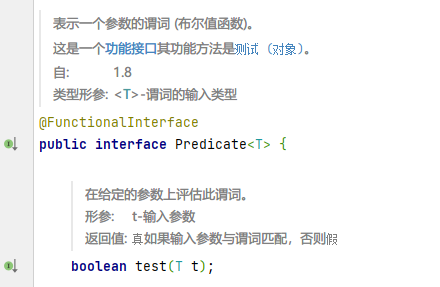
public static void main(String[] args) {
    //写一个方法判断字符串是否为空
    /*Predicate<String> predicate = new Predicate<String>() {
        @Override
        public boolean test(String s) {
            return s==null || s.isEmpty();
        }
    };*/

    //lambda简化
    Predicate<String> predicate = s -> s==null || s.isEmpty();

    System.out.println(predicate.test(""));
}
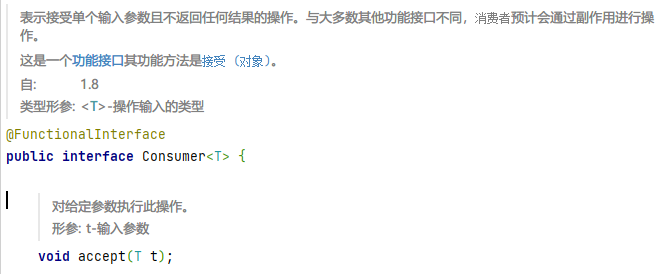
Consumer
消费型接口,只有输入,没有返回值
public static void main(String[] args) {
    /*Consumer<String> consumer = new Consumer<String>() {
        @Override
        public void accept(String o) {
            System.out.println(o);
        }
    };*/

    //Consumer<String> consumer = s-> System.out.println(s);
    Consumer<String> consumer = System.out::println;

    consumer.accept("sdf");
}
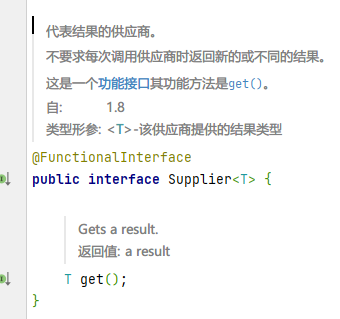
Supplier
供给型接口,没有参数,只有返回值
public static void main(String[] args) {
    /*Supplier<String> supplier = new Supplier<String>() {
        @Override
        public String get() {
            return "sdf";
        }
    };*/
    Supplier<String> supplier = ()->"123";
    System.out.println(supplier.get());
}
Stream流式计算
public static void main(String[] args) {
    User a = new User(1, "a", 21);
    User b = new User(2, "b", 22);
    User c = new User(3, "c", 23);
    User d = new User(4, "d", 24);
    User f = new User(6, "f", 25);
    List<User> users = Arrays.asList(a,b,c,d,f);

    users.stream()
            //取ID为偶数的用户
            .filter(x -> x.getId() % 2 == 0)
            //取年龄大于23的用户
            .filter(x -> x.getAge() > 23)
            //将对象的名字转为大写
            .peek(x -> x.setName(x.getName().toUpperCase()))
            //将用户按名称倒序排序
            .sorted((u1,u2)->u2.getName().compareTo(u1.getName()))
            //取一个用户
            .limit(1)
            //遍历打印
            .forEach(System.out::println);

}
ForkJoin
什么是ForkJoin?
ForkJoin在JDK1.7中出来,并行执行任务!提高效率,大数据量!亿级别。
大数据:Map Reduce(把打任务拆分成小任务)
特点
工作窃取。比如A线程和B线程同时执行一堆任务,当B线程的任务执行完成后,会从A线程的任务中取出任务来执行,这个叫做工作窃取。
举例:计算1~1000_0000_0000的和
public class Test {
    public static void main(String[] args) throws ExecutionException, InterruptedException {
        test1();
        test2();
        test3();
    }

    //普通计算方法
    public static void test1(){
        long start = System.currentTimeMillis();
        long sum = 0;
        for (long i = 1; i <= 1000_0000_0000L; i++) {
            sum += i;
        }
        long end = System.currentTimeMillis();
        System.out.print("计算结果:"+sum);
        System.out.println(" 耗时:"+(end-start)*1.0/1000+"s");
    }

    //使用ForkJoin计算
    public static void test2() throws ExecutionException, InterruptedException {
        long start = System.currentTimeMillis();
        ForkJoinPool forkJoinPool = new ForkJoinPool();
        ForkJoinTask<Long> res = forkJoinPool.submit(new ForkJoinDemo(0L,1000_0000_0000L,10000L));
        Long sum = res.get();
        long end = System.currentTimeMillis();
        System.out.print("计算结果:"+ sum);
        System.out.println(" 耗时:"+(end-start)*1.0/1000+"s");
    }

    //使用Stream并行流
    public static void test3(){
        long start = System.currentTimeMillis();

        long sum = LongStream.rangeClosed(0L, 1000_0000_0000L).parallel().reduce(0, Long::sum);

        long end = System.currentTimeMillis();
        System.out.print("计算结果:"+ sum);
        System.out.println(" 耗时:"+(end-start)*1.0/1000+"s");
    }
}
任务类:
@Data
@AllArgsConstructor
@NoArgsConstructor
public class ForkJoinDemo extends RecursiveTask<Long> {
    private Long start;
    private Long end;

    //临界值
    private Long temp;


    @Override
    protected Long compute() {
        //如果计算量大于了临界值,就使用ForkJoin进行计算
        if(end-start > temp){
            //取一个中间值,将计算任务分成两部分
            long middle = start + (end - start) / 2;
            ForkJoinDemo task1 = new ForkJoinDemo(start, middle, 10000L);
            //把任务压入线程队列
            task1.fork();
            ForkJoinDemo task2 = new ForkJoinDemo(middle+1, end, 10000L);
            task2.fork();

            return task1.join() + task2.join();
        }else{
            //否则使用普通的方法进行计算
            long sum = 0;
            for (long i = start; i <= end ; i++) {
                sum += i;
            }
            return sum;
        }
    }
}
运行结果
计算结果:932356074711512064 耗时:54.723s
计算结果:932356074711512064 耗时:18.843s
计算结果:932356074711512064 耗时:12.126s
异步回调
Future设计的初衷:对将来某个事件的结果进行建模
Future接口有个实现类,CompletableFuture类,可以实现异步回调。与Ajax类似,有如下功能:
- 异步执行
- 成功回调
- 失败回调
举两个栗子
- 没有返回值的异步回调(
runAsync())
public class FutureDemo {
    public static void main(String[] args) throws ExecutionException, InterruptedException {
        //Void是关键字void的封装类,表示没有返回结果
        CompletableFuture<Void> voidCompletableFuture = CompletableFuture.runAsync(() -> {
            try {
                TimeUnit.SECONDS.sleep(2);
            } catch (InterruptedException e) {
                e.printStackTrace();
            }
            System.out.println(Thread.currentThread().getName());
        });
        System.out.println("1111");
        //阻塞获取返回值
        voidCompletableFuture.get();
    }
}
Void是void关键字的封装类,表示没有返回值
运行结果
1111
ForkJoinPool.commonPool-worker-1
voidCompletableFuture.get();起到了阻塞获取返回值的作用,虽然这里没有返回值,但主线程依然会被阻塞,直到异步程序执行完成。如果这里不阻塞,程序将直接结束,不会打印出线程名。
- 有返回值的异步回调(
supplyAsync())
public class FutureDemo2 {
    public static void main(String[] args) throws ExecutionException, InterruptedException {

        Integer integer = CompletableFuture.supplyAsync(() -> {
            System.out.println(Thread.currentThread().getName());
            //int i = 1/0;
            return 1024;
        }).whenComplete((t, u) -> {
            System.out.println("T:" + t);
            System.out.println("U:" + u);
        }).exceptionally((e) -> {
            System.out.println(e.getMessage());
            return 500;
        }).get();

        System.out.println(integer);

    }
}
运行结果
ForkJoinPool.commonPool-worker-1
T:1024
U:null
1024
或
ForkJoinPool.commonPool-worker-1
T:null
U:java.util.concurrent.CompletionException: java.lang.ArithmeticException: / by zero
java.lang.ArithmeticException: / by zero
500
参数解释
whenComplete方法
T: 成功执行的返回值
U: 执行失败的返回值
exceptionally方法
e: 执行时的异常信息
JMM
什么是JMM?
是Java的内存模型,是一个概念,不存在的东西
关于JMM的一些同步的约定
- 线程解锁前,必须把共享变量like刷回主内存
- 线程加锁前,必须读取主存中的最新值到工作内存中
- 加锁和解锁是同一把锁
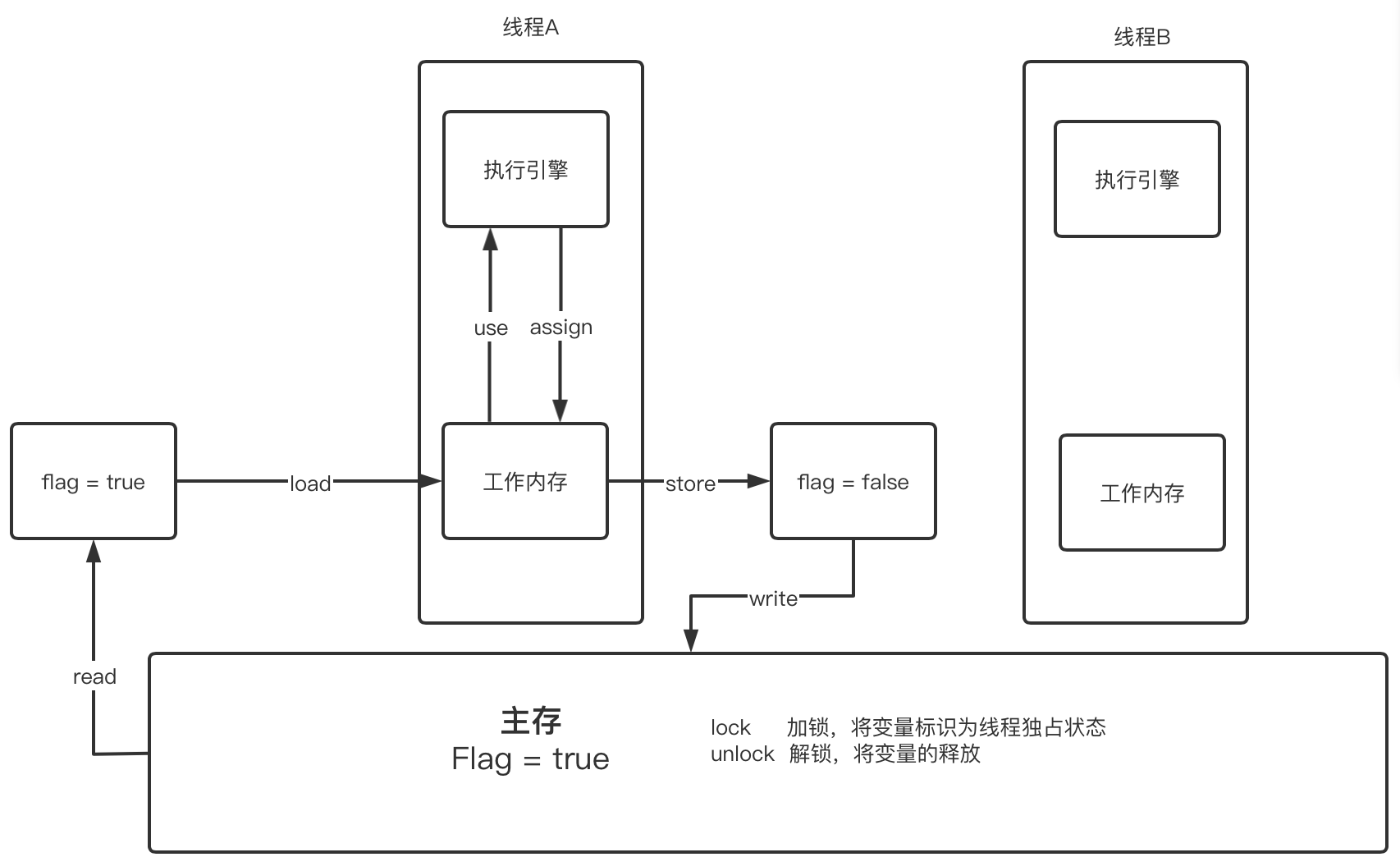
JMM的八种操作(每种操作都是原子操作)
- read 从主存中读取变量
- Load 将读取的变量加载到线程的工作内存中
- use 线程的执行引擎使用变量
- assign 执行引擎将变量的值重新赋值到工作内存中
- store 从工作内存中取得变量
- Write 将工作内存中取得的变量写入到主存中
- Lock 作用于主存,将变量标识为线程独占
- Unlock 作用与主存,将变量释放,释放后才可以被其他线程独占
对八种操作的规则
- 不允许read和load、store和write操作之一单独出现。即使用了read必须load,使用了store必须write
- 不允许线程丢弃他最近的assign操作,即工作变量的数据改变了之后,必须告知主存
- 不允许一个线程将没有assign的数据从工作内存同步回主内存
- 一个新的变量必须在主内存中诞生,不允许工作内存直接使用一个未被初始化的变量。就是怼变量实施use、store操作之前,必须经过assign和load操作
- 一个变量同一时间只有一个线程能对其进行lock。多次lock后,必须执行相同次数的unlock才能解锁
- 如果对一个变量进行lock操作,会清空所有工作内存中此变量的值,在执行引擎使用这个变量前,必须重新load或assign操作初始化变量的值
- 如果一个变量没有被lock,就不能对其进行unlock操作。也不能unlock一个被其他线程锁住的变量
- 对一个变量进行unlock操作之前,必须把此变量同步回主内存
Volatile
请你谈谈对Volatile的理解?
Volatile是Java虚拟机提供的轻量级的同步机制
- 保证可见性
public class volatileDemo {

    //不加volatile,程序就会死循环
    //加了volatile,程序就会自动终止
    public volatile static int num = 0;

    public static void main(String[] args) {

        new Thread(()->{
            while (num==0){
                //打印也会导致程序停止
                //System.out.println(Thread.currentThread().getName());
            }
        }).start();

        try {
            TimeUnit.SECONDS.sleep(1);
        } catch (InterruptedException e) {
            e.printStackTrace();
        }

        System.out.println(1);

        num = 1;

    }
}
不加volatile,程序就会死循环,因为main线程改变num时,循环线程感知不到。
加了volatile,程序就会正常退出,可以保证可见性
不保证原子性
禁止指令重排